Lecture 5 - Start to finish: build, break, fix

Announcements:
Three tools, one workflow
- The shell (Lecture 2), to move around and run things
- Rust and Cargo (Lecture 3), to build a program
- Git (Lecture 4), to keep its history
Today we walk through using all three together, start to finish, to see how they work together (and fit in a bit of review)
The loop
Everything you do for the rest of this course is some version of this:
- Write a little
cargo run- Notice it doesn't compile!
- Read what the compiler said
- Fix it
cargo runand it works!cargo testand it passes the tests!git add .,git commit -m "..."git pushso work is saved
Step 3 is not failure. It is the normal state (SNAFU), and today we'll learn to love those errors (at least a little)
Learning objectives
By the end of this lecture, you should be able to:
- Start from scratch and make a rust program with history: make it, run it, break it, fix it, commit it, push it
- Read a Rust compiler error: find the code, the line, and the suggested fix, and know that the fix does not always belong on the line the error names
- Know the shell, git, and cargo commands you are responsible for
- Make a branch, open a pull request, and merge it back
- Undo a bad commit with
git revert, and say why that is safer than deleting it from history
What you're accountable for
The shell commands you should know
Move around and look:
pwdls(plusls -aandls -l)cd(pluscd ..andcd ~)catwhich
Make and change things:
mkdir,touch,cp,mv,rm(andrm -rf)echo "some words" >> filename.txtas a way to append text to a filenano
The git commands you should know
Starting a repository:
git init- The concept of
git clone(you'll usually copy the command from github)
The everyday loop:
git status,git add,git commit -m,git push,git pull
Looking at what changed:
git log,git diff
Fixing things
git restore,git revert
Working with other people:
git branch,git checkout,git merge
Cargo and rustc
cargo newcargo build,cargo run,cargo checkcargo testcargo run --releaserustc
Let's practice!
The program from Wednesday (with a bug)
fn main() {
    let scores = vec![85, 92, 78, 96];
    scores.push(88);

    let total: i32 = scores.iter().sum();
    let average = total as f64 / scores.len() as f64;

    if average >= 90.0 {
        println!("Excellent! Average: {:.1}", average);
    } else if average >= 80.0 {
        println!("Good work! Average: {:.1}", average);
    } else {
        println!("Keep trying! Average: {:.1}", average);
    }
}
Notes:
Breaking down the compiler error
error[E0596]: cannot borrow `scores` as mutable, as it is not declared as mutable
 --> src/main.rs:3:5
  |
3 |     scores.push(88);
  |     ^^^^^^ cannot borrow as mutable
  |
help: consider changing this to be mutable
  |
2 |     let mut scores = vec![85, 92, 78, 96];
  |         +++
Every compiler error has the same five parts:
- An error code, like
E0596. You can look it up:rustc --explain E0596(or google it!) - A one-line summary of what is wrong
- Where it happened, as
file:line:column - Your code, with a caret pointing at the exact spot
- Usually, a suggested fix
Rust's error messages are unusually good. They are long because they are trying to help!
Demo: let's fix it (and break it again)
Notes:
 Commit when something works, not when you take breaks. Let it feel like a little celebration, patting yourself on the back for building or fixing something.
Now the fun part: how to get ourselves out of trouble
But now if we...
cargo run
Oh no! We saved a bug in our last commit and we kept going! Let's find what went wrong
git log --oneline # find the commit that did it
How do we "undo a commit"? It's safer not to... instead we
git revert a1b2c3d
This makes a new commit that undoes what that old commit did. The bad commit stays in the history, and so does the fact that you undid it.
Why we do this:
- Your history stays honest
- It won't collide with someone else's work
(Yes there is a way to truly delete a commit, git reset --hard, but it's generally not best practice so you don't need to learn it)
A branch is somewhere to work without breaking main
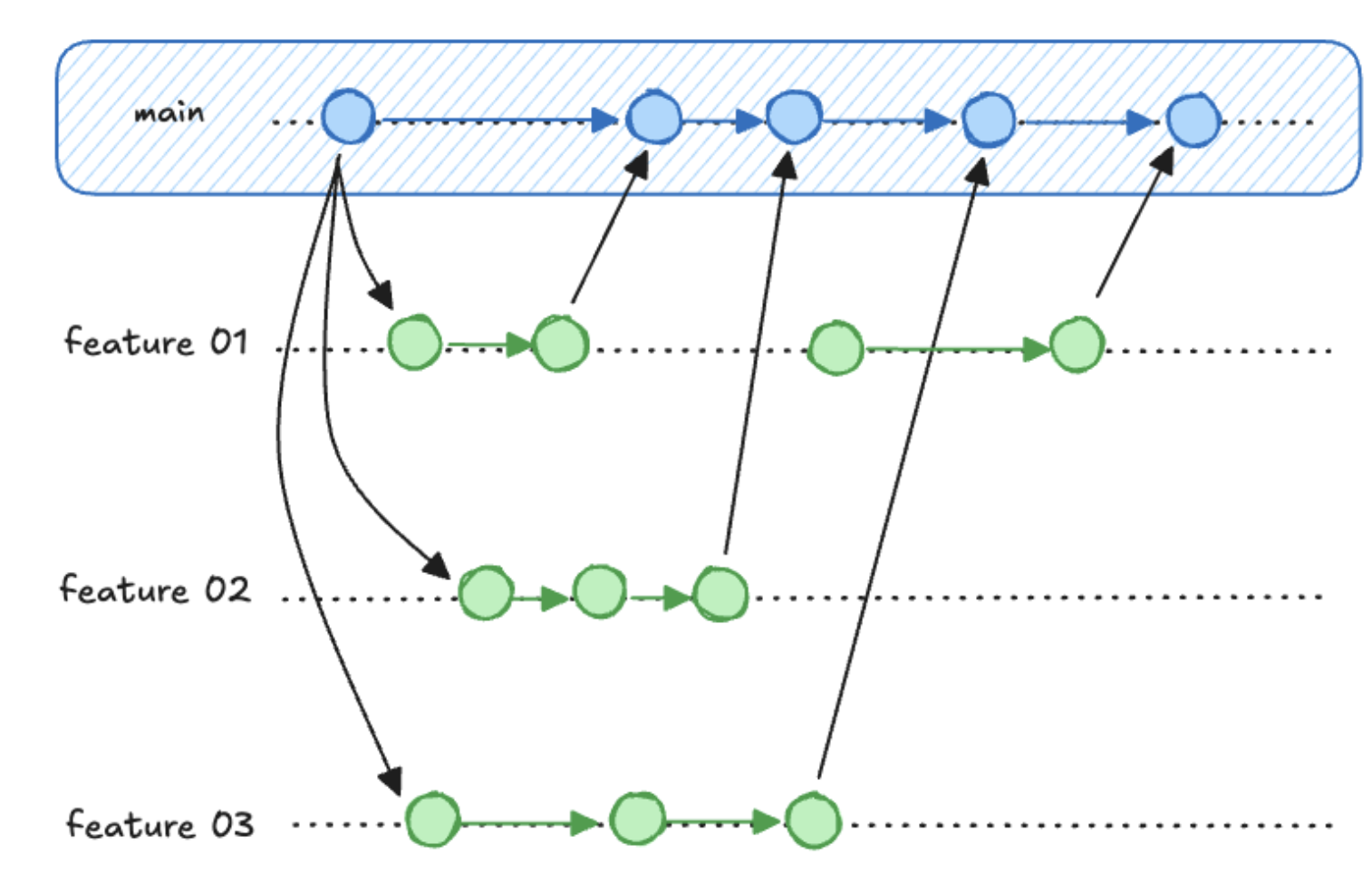
main is the version that works. A branch is a second timeline where you can make a mess.
git branch                          # which branches exist, and where you are
git checkout -b add-letter-grades   # make one and switch to it
# edit, cargo check, commit as usual
git push -u origin add-letter-grades
Nothing you do on the branch touches main until you ask for it.
You'll get hands-on practice with branching this week in discussion!
A pull request is how you ask to bring it back
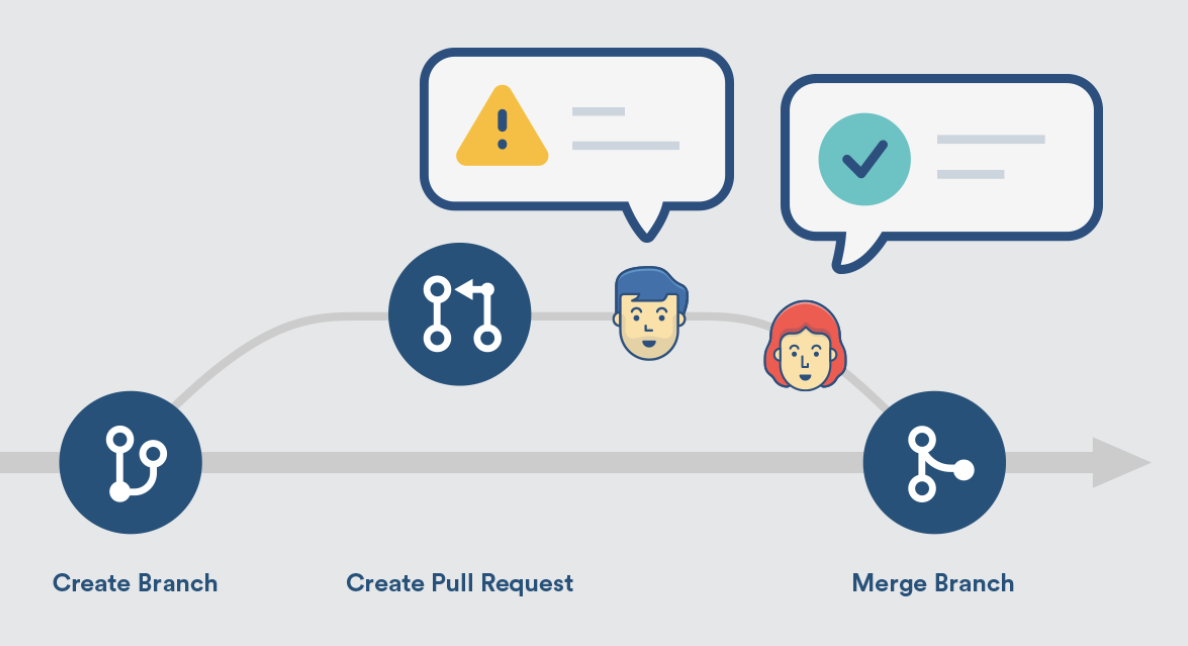
On GitHub, open a pull request from your branch into main:
- It shows the diff. Exactly what would change, nothing hidden
- Somebody reads it and comments (this is why we do it!)
- When everyone is happy, merge, and the branch's commits join
main - Back in the terminal:
git checkout main, thengit pull
Let's try it.
Working with AI without wasting the semester
Your guesses to the mystery question:
How to code with AI and still learn something
Imagine you're learning French and typing your first awkward essay. Every time you start typing a sentence, something completes it for you, perfectly, with flawless grammar.
What are you learning?
You've learned how to use autocomplete. You are not learning French.
How would you use AI or other tools to learn a language?
(A few volunteers?)
Where AI hurts you in this course
You are here to learn Rust, and systems, and data science, not autocomplete.
So my number one suggestion is... Turn off autocomplete.
It stops you from being uncomfortable. It stops you from struggling.
Discomfort is what learning feels like. So it stops you from learning.
(Like exercise!)
Actionably:
- Turn off copilot suggestions (VS Code ships with that on!) (click on the robot in the bottom right and hit "disable completions")
- Tell your AI (Cursor, Claude Code, Copilot) to answer your questions but not edit your file directly
Where AI helps you in this course
Good places to use it:
- "What does this compiler error mean?"
- What's the name of the function that does x?
- Do you have feedback on how I wrote this? once it already works
- "Explain this concept a different way" when lecture wasn't enough
In every case you did some thinking first and you can tell whether the answer is any good. You won't blindly accept a bad answer
A workflow that actually works
- Think on paper. What is this supposed to do? What are the steps?
- Write the steps out in plain English, in comments, before any Rust (this is called "pseudocode")
- Write what you can.
- Then ask for help with the specific thing you're stuck on
- Read the answer until you could have written it. If you can't, ask about what you don't understand
Remember, for code review, you need to be able to explain everything you wrote!
In-Class Activity: compiler error hunt
So we're going to hold back on some tools for this one.
Install still not working? You can still do the activity
The Rust Playground compiles and runs Rust in your browser. Nothing to install, nothing to configure.
It is not a substitute for a real setup, and you will need one for Project 1. But we'll often use this for activities because:
- It's faster to get started
- It doesn't have rust-analyzer
Instructions
Working in pairs, in the Rust Playground ^
Program and instructions: https://rust4ds.github.io/ds210-fa26-lectures/activities/activity_5.html
- Paste the program in and Run it, so you know it works to start with
- Make one change at a time that breaks it. Misspell, delete, reorder, change a type
- Run it and read what comes back
- Write it on your half sheet: what you changed, and what the compiler said
- Undo it, and break it a different way
Goal: at least 8 different errors. There is room for 12 on your sheet if you get on a roll.
Debrief
-
Which error was the most confusing?
-
Which error message was the most helpful?
-
Did any errors surprise you?
-
Anything you thought would produce an error that didn't?
-
Let's make a list together. How many did we find?
Coming up
- Discussion this week is git practice: branches, merging, and what to do when git cannot merge two changes by itself
- Wednesday: variables and types. We start writing our own Rust rather than editing someone else's
- Project 1 checkpoint 1 is due Friday