Lecture 6 - Variables: types and their properties
Announcements
Learning Objectives
By the end of this lecture, you should be able to:
- Use the
mutkeyword and shadowing withletto modify variables - Declare constants using
const - Understand Rust's basic types and their sizes (ints, floats,
bool,char,&str) - Use type annotation (with
let), type conversion (as), and type inference - Work with boolean values using comparisons (
==,!=,<,>=) and logical operators (&&,||,!)
Variables and Mutability
Variables are by default immutable!
Let's try this and then fix it.
fn main(){
    let x = 3;
    x = x + 1;
    println!("{x}")
}
Why can't we do this now?
fn main(){
    let mut x = 3;
    x = 9.5;
    println!("{x}")
}
One way to fix - Variable shadowing: new variable with the same name
fn main(){
    let solution = "4";
    let solution : i32 = solution.parse()
                        .expect("Not a number!");
    let solution = solution * (solution - 1) / 2;
    println!("solution = {}",solution);
    let solution = "This is a string";
    println!("solution = {}", solution);
}
Variables vs Constants
Sometimes you need values that never change and are known at compile time:
#![allow(unused)]
fn main() {
const MAX_PLAYERS: u32 = 100;
const PI: f64 = 3.14159;
const GREETING: &str = "Hello, world!";
}
Constants:
- Are always immutable (no
mutallowed) - Use
constinstead oflet - Must have explicit types
- Named in
ALL_UPPERCASEby convention - Can be declared in any scope (including global)
- Must be computable at compile-time (so typically hard-coded)
When to use constants vs variables:
- Constants: Mathematical constants, configuration values, limits
- Variables: Data that might change or is computed at runtime
Types
Integers and Binary representations
Representing 13:
- In decimal (base 10): 13 = 1×10¹ + 3×10⁰
- In binary (base 2): 1101 = 1×2³ + 1×2² + 0×2¹ + 1×2⁰ = 8 + 4 + 0 + 1 = 13
For example, the number 13 in binary is 1101:
Binary:   1 1 0 1
Position: 3 2 1 0
2x^n:     8 4 2 1
Value:    8 4 0 1  → 8+4+1 = 13
T/P/S - What's the largest integer we can represent with 4 binary digits?
Bits and bytes
- Bit: The smallest unit of data in computing - can store either 0 or 1
- Byte: A group of 8 bits, which can represent 2⁸ = 256 different values (0-255)
- Computers typically address memory in byte-sized chunks
- (In sizes like "16 GB of RAM" GB refers to "gigaBYTES" not gigaBITS)
So what are ints, under the hood
Unsigned integers are stored in binary format.
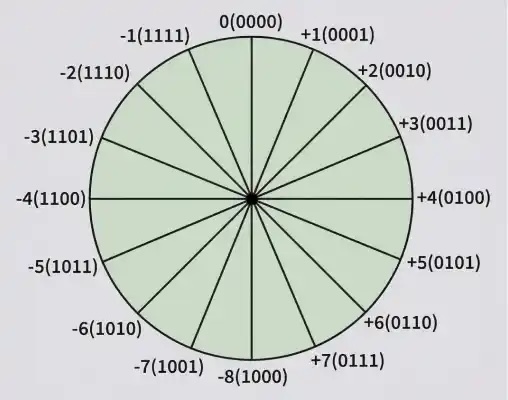
But (signed) integers are stored in two's complement format, where:
- if the number is positive, the first bit is 0
- if the number is negative, the first bit is 1
To calculate the two's complement of a negative number, we flip all the bits and add 1.
Let's try it:
// binary representation of 7 and -7
println!("{:032b}", 7);
println!("{:032b}", -7);
Why Two's Complement?
Integers come in all shapes and sizes
- unsigned integers:
u8,u16,u32,u64,u128,usize(architecture specific size, default for.len())- from to
- signed integers:
i8,i16,i32(default),i64,i128,isize(architecture specific size)- from to
 These numbers (like
 u16) refer to bits, not bytes!
Different types don't play nice together
fn main(){
    let x : i16 = 13;
    let y : i32 = -17;
    println!("{}", x * y);   // will not work
    // println!("{}", (x as i32)* y);
}
if you need to convert, use the as operator
Be careful with math on ints
u8 is 8 bits and can store maximum value 2^8 - 1 = 255.
If we multiply: .
How many bits do we need to store this value? We can take the log base 2 of the value.
fn main(){
    let a: u8 = 255;
    let product = a as u32 * a as u32; // why u32? let's change it!

    println!("{} * {} = {}", a, a, product);
    println!("log base 2 is {}", (product as f64).log2());
}
So we need 16 bits to store the product of two u8 values.
In general when we multiply two numbers of size bits, we need bits to store the result.
Types - Floats
Why are they called floats?
- Two kinds:
f32andf64(default) - What do these mean?
Sizes of floats
#![allow(unused)]
fn main() {
println!("F32 min is {} max is {}", f32::MIN, f32::MAX);
println!("F32 min is {:e} max is {:e}", f32::MIN, f32::MAX);
println!("F64 min is {:e} max is {:e}", f64::MIN, f64::MAX);
}
Why these sizes?
f32: 1 sign bit + 8 exponent bits + 23 significance bitsf64: 1 sign bit + 11 exponent bits + 52 significance bits
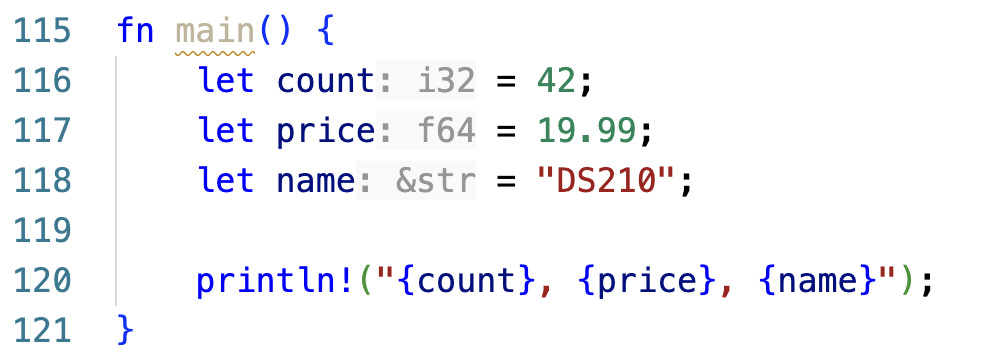
You don't always have to write the type, but there is always a type
fn main(){
    let count = 42;
    let price = 19.99;
    let name = "DS210";

    println!("{count}, {price}, {name}");
}
Nothing here says i32, f64 or &str.
Each of those vars has exactly one though, decided at compile time.
Rust (often) works out types from the value and what you do with it later.
When it can't it will let you know (with an error).
Your editor will tell you what Rust worked out
rust-analyzer writes the type in next to each let, greyed out, as though you had typed it yourself.
Floats and Rust's type inference system
fn main(){
    let x:f32 = 4.0;
    let y:f32 = 4; // Will not work.  It will not autoconvert for you.

    let z = 1.25; // won't get automatically assigned a type yet

    println!("{:.1}", x * z);

    //println!("{:.1}", (x as f64) * z);
}
Two ways to put a variable in println!
#![allow(unused)]
fn main() {
let name = "Ada";
let age = 20;

println!("{} is {}", name, age);  // separate arguments, filled in order
println!("{name} is {age}");      // the name goes inside the braces
}
Both print Ada is 20. You'll see both styles.
Only a plain variable name fits inside the braces. For anything else, use {} and pass it separately:
println!("{age + 1}");            // compiler error
println!("{}", age + 1);          // fine
Formatting in println!
You can control how numbers are displayed using format specifiers:
#![allow(unused)]
fn main() {
let total = 21.613749999999997;
let price = 19.99;
let big_number = 1_234_567.89;
let small_number = 0.000123;
let count = 42;

// Float formatting
println!("Default: {}", total);         // Default: 21.613749999999996
println!("2 decimals: {:.2}", total);   // 2 decimals: 21.61
println!("Currency: ${:.2}", price);    // Currency: $19.99

// Scientific notation
println!("Scientific: {:e}", big_number);    // Scientific: 1.23456789e6
println!("Scientific: {:.2e}", small_number); // Scientific: 1.23e-4

// Integer formatting
println!("Default: {}", count);         // Default: 42
println!("Width 5: {:5}", count);       // Width 5:    42
println!("Zero-pad: {:05}", count);     // Zero-pad: 00042
println!("Binary: {:b}", count);        // Binary: 101010
println!("Hex: {:x}", count);           // Hex: 2a
}
We won't expect you to memorize those - if you need them on an exam we'll give them to you in an appendix!
Mini-Quiz
Take a minute to talk to a partner about what these do, then I'll call on you
cargo new my_projectcargo checkgit add .rustc hello.rsgit pullcargo run --releasegit commit -m "fix bug"
Types - Booleans (and logical operators)
booluses one byte of memory (why not one bit?)
#![allow(unused)]
fn main() {
let x = true;
let y: bool = false;

println!("{}", x && y); // logical and
println!("{}", x || y); // logical or
println!("{}", !y);    // logical not

}
FYI there are "bitwise" operators that use single symbols (& and |) and also do binary arithmetic... but you won't need them. Just remember to use double && and || by default!
Comparisons give you a bool
#![allow(unused)]
fn main() {
let age = 20;

println!("{}", age == 20);             // equal
println!("{}", age != 21);             // not equal
println!("{}", age >= 18 && age < 21); // combine them with && and ||
}
Also <, >, <=, >=, same as Python.
= sets a value, == asks a question. if age = 20 gives a compiler error.
One more shortcut, also the same as Python:
#![allow(unused)]
fn main() {
let mut count = 0;
count += 1;   // same as count = count + 1
count -= 1;   // same as count = count - 1
}
(but Rust doesn't have count++)
Types - Characters
chardefined via single quotes, uses four bytes of memory (that's how many bits?)- For a complete list of UTF-8 characters check https://www.fileformat.info/info/charset/UTF-8/list.htm
#![allow(unused)]
fn main() {
let x: char = 'a';
let y = '🚦';
let z = '🦕';

println!("{} {} {}", x, y, z);
}
Try Control-Command-Space (Mac) or Windows-Key + . (Windows) to add emojis anywhere!
Types - Strings
- A string slice (
&str) is defined via double quotes - A
String(with a capital S!) is something different - We'll talk a lot more about the difference later. Until then, you'll primarily use
&strand we'll try to steer you away from trouble.
fn main() {
    let s1 = "Hello! How are you, 🦕?";  // type is `&str`
    let s2 : &str = "Καλημέρα από την Βοστώνη και την DS210";  // here we make the type explicit

    println!("{}", s1);
    println!("{}\n", s2);

    // This doesn't work.  You can't do String = &str
    //let s3: String = "Does this work?";

    let s3: String = "Does this work?".to_string();
    println!("{}", s3);
    let s4: String = String::from("How about this?");
    println!("{}\n", s4);
    let s5: &str = &s3;
    println!("str reference to a String reference: {}\n", s5);

    // This won't work.
    // println!("{}", s1[3]);
    // println!("{}", s4[3]);

    // But you can index this way.
    println!("4th character of s1: {}", s1.chars().nth(3).unwrap());
    println!("3rd character of s3: {}", s4.chars().nth(2).unwrap());
}
Activity time!
Tear off the last sheet in your packet. Instructions are there.
You can work in small groups but EACH person needs to fill in a sheet.
Make hypotheses for everything before breaking out laptops to test!