Lecture 3 - Hello Rust: your first program, and why it is fast

Announcements
Learning objectives
By the end of class today you should be able to:
- Explain what a compiler and a compiled language are
- Create a simple "hello world" Rust program with proper syntax (
fn, brackets) - Use
rustcandcargoto compile and run Rust programs - Explain what mutable and immutable variables are in Rust
Rust in three concepts
- Compiled
- Type-safe
- Memory-safe
What is a compiler?
Think for a moment, then turn to your neighbor: What is a compiler? What does it actually do?
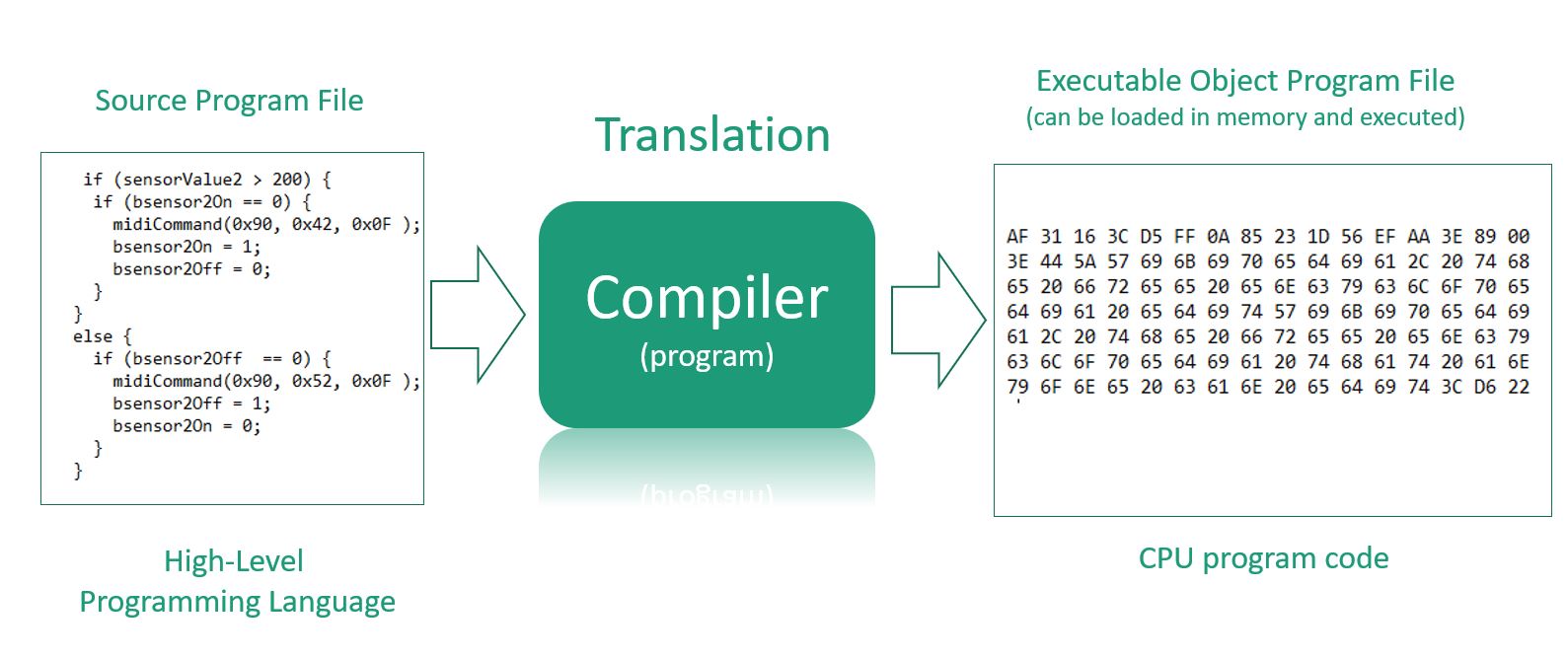
A compiler translates your whole program into machine code once, ahead of time.
Your computer then runs the resulting machine code.
Python is interpreted instead: the interpreter reads your code and executes it line by line, every time you run it.
Type-safe and memory-safe
Type-safe
- Every value has a type, and the compiler refuses to mix and match
Memory-safe
- The compiler restricts what variables you can change and when to prevent a large class of issues with older languages
The same benefit:
- Issues that crash Python or C/C++ at runtime will be caught by Rust before anything runs
We'll understand this a lot more clearly as we go!
Demo: your first Rust project
cargo new hello_rust --vcs none
cd hello_rust
ls -a
What did that give us?
cat Cargo.toml
cat src/main.rs

cargo run
ls
Rust v Python
Rust v Python - Basic function writing
Rust
fn main() {
    println!("Hello, world!");
}
Python
def main():
    print("Hello, world!")

main()
What differences do you notice?
fnkeyword for functions- Braces
{}for code blocks - Semicolons
;end statements println!is a macro (the!means macro) - more on this latermainruns on its own
Rust v Python - Variables, types, and mutability
RUN ME!
fn main() {
    let x = 5;          // immutable by default
    let mut y = 10;     // mut makes it mutable
    y = 15;             // this works
    // x = 6;           // this would error!
    // y = "today"     // this would also error!

    println!("x is {}, y is {}", x, y);
}
Key differences from Python:
- Python: everything mutable by default
- Rust: immutable by default with fixed types
Rust v Python: which one is the real thing?
If you haven't been bitten by python like this yet, you will.
a = [1, 2, 3, 4]
b = a[1:3]        # slice a list
b[0] = 99

print(a)          # [1, 2, 3, 4]   unchanged
import numpy as np
c = np.array([1, 2, 3, 4])
d = c[1:3]        # slice an array
d[0] = 99

print(c)          # [1, 99, 3, 4]  CHANGED
Same syntax. Opposite behavior.
Nothing in either line of code tells you which one to expect.
Show of hands for which you prefer?
In Rust you have to say which one you meant
let b = a;           // move:   a is gone, b owns it now
let b = a.clone();   // copy:   two separate values
let b = &a;          // borrow: b just looks at a
Three different behaviors. Three different notations.
It's always clear what's happening. You never have to wonder what b = a did.
Compiling and running
Rust works in two steps
Python: One Step (Interpreted)
python hello.py
- Python reads your code line by line and executes it immediately
- No separate compilation step needed
Rust: Two Steps (Compiled)
# Step 1: Compile (translate to machine code)
rustc hello.rs

# Step 2: Run the executable
./hello
rustcis your compiler that translates Rust program to machine code- Then you run the executable (why
./?)
Rust with Cargo (two-in-one)
# Set-up steps (one time)
cargo new my_project
cd my_project

# Build and run (compiles automatically)
cargo run
- Cargo uses
rustcunder the hood
 Cargo has to be run from inside the project. If you see "could not find
 Cargo.toml", you are standing in the wrong folder. pwd to see where you are, cd to fix it.
Cargo can do it in two steps too
cargo build                  # compile only
./target/debug/my_project    # run what it built
cargo run is those two commands in one.
You already saw both halves in the demo. cargo run compiled and ran it, then we went into target/debug and ran the executable ourselves, and got the same output.
Two steps or one. Same program either way.
Where do rustc and cargo actually live?
You typed rustc. You never said where it is. So how did the shell find it?
which rustc     # /Users/you/.cargo/bin/rustc
which cargo     # /Users/you/.cargo/bin/cargo
which ls        # /bin/ls
They are files, sitting in a folder, exactly like everything you looked at on Friday.
When you type a command, the shell searches a list of folders for a file with that name. That list is an environment variable:
echo $PATH
# /Users/you/.cargo/bin:/opt/homebrew/bin:/usr/local/bin:/usr/bin:/bin
Folders separated by colons, searched left to right. First match wins.
Installing Rust is mostly this: put some files in ~/.cargo/bin, then add that folder to your PATH.
Putting a folder on the PATH yourself
You will often do this when you install a new tool.
For this terminal window only:
export PATH="$HOME/my_tools:$PATH"
To make it permanent, put that line in the file your shell reads on startup, then open a new terminal:
nano ~/.zshrc          # macOS
nano ~/.bash_profile   # Git Bash on Windows
"command not found" usually means "not on the PATH", not "not installed". Check with which, then check echo $PATH, before you reinstall anything.
And that is why you had to type ./hello
Your current directory is not on the PATH.
So plain hello means "search the PATH folders", and it is not in any of them.
./hello means "the file called hello, right here."
So what does that buy us?
Adding up ten million numbers
The same program, written twice. Build a list of ten million numbers, then add them all up.
sum = 0
for number in numbers:
    sum = sum + number
let mut sum = 0;
for number in numbers {
    sum = sum + number;
}
Same answer, every time. How long should each one take? (Write your guesses)
Write a guess now. Fill in the rest as we go.
| Your guess | What it was | Notes | |
|---|---|---|---|
| Python | |||
Rust, cargo run | |||
Rust, cargo run --release |
Adding up ten million numbers
| Time | |
|---|---|
| Python | ~500 ms |
Rust, cargo run | ~40 ms |
Rust, cargo run --release | ~1.4 ms |
Around 350x faster.
--release tells the compiler to spend longer optimizing. The default build skips that so it compiles faster while you are working. We come back to it on Monday.
If you're a large tech company (like every AI company) this cuts your compute bill by billions of dollars.
Always use --release when evaluating your program's performance to get the best times!
Why is Rust faster than Python?
Python's python3 command is an interpreter.
It's like watching a speech in a foreign language with a live interpreter: it works, you understand it, but every sentence costs you the interpreter's time.
Rust translates the whole thing once, ahead of time, into the computer's own language. Then it just runs. No interpreter in the room.
In-Class Activity: put the program together
- Get in groups of 2-3
- Send one person up to get a packet
- Write your names on the submission sheet
Place the lines in order in two parts on the page: your shell, and your code file src/main.rs, to make a reasonable sequence and a working program.
Full instructions: Activity 3
Coming up
- If you need more help getting set up after discussion follow up on Piazza
- Friday: git and GitHub. We put this project under version control, and Project 1 goes out
- Monday we build a whole program start to finish