Rust Variables and Types
or how I learned to stop worrying and love the types1
Lecture 3: Thursday, May 21, 2026 and
Lecture 4: Tuesday, May 26, 2026.
Code examples
Rust is a statically typed programming language! Every variable must have its type known at compile time. This is a stark difference from Python, where a variable can take on different values from different types dynamically.
This has some really deep consequences that differentiate programming in Rust from that in Python.
To illustrate this better, let’s start with a simple motivating example from Python.
Motivating example
Let’s start with the following simple example from Python. Let’s say we have two Python lists names and grades.
The first stores the names of different students in a class. The second one stores their grades. These lists are index-aligned:
the student whose name is at names[i] has grade grades[i].
names = ["Kinan", "Matt", "Taishan", "Zach", "Kesar", "Lingjie", "Emir"]
grades = [ 0,      100,    95,        88,     99,      98,       97]
# Kinan's grade is 0, Kesar's grade is 99
Now, imagine we need to write some Python code to print the grade of a student given their name. Let’s say the name
of this target student is stored in a variable called target.
# Alternatively, the value of target might be provided by the
# user, e.g., via some nice UI
target = "Kesar"
Our first observation is that the grades and names are index-aligned. So to find the grade of “Kesar”,
we need to find the index of “Kesar” in names. Let’s do that using a helper function. Here’s a reasonable first attempt:
def find_index(target, names):
    # iterate from 0 up to the length of names.
    for i in range(len(names)):
        if target == names[i]:
            return i
Now, we can use find_index to retrieve the grade of “Kesar” as follows.
target = "Kesar"
index = find_index(target, names)
print(grades[index])
This indeed works, and if we run it, we will see the correct output.
99
The code will also work for many other values of target, e.g. “Kinan”, “Matt”, “Emir”, etc.
However, what if we search for a target who is not in names? For example, target = tom?
In this case, find_index never finds a name equal to target, and so its for loop finishes without ever returning any i.
def find_index(target, names):
    for i in range(len(names)):
        # when target = 'Tom'
        # then this condition is False for all elements in names
        if target == names[i]:
            # this is never reached for target = 'Tom'
            return i

    # instead, when target='Tom' the execution reaches this point.
    # What should we return here?
    return ?????
A good follow up question is what should find_index return in such a case?
Discuss this with your neighbor and come up with a candidate value!
Option 1: return -1
Many languages, e.g., Java, use -1 to indicate having not found something. Let’s consider what happens
if we try that out in our Python example. In this case, our find_index function becomes:
def find_index(target, names):
    for i in range(len(names)):
        if target == names[i]:
            return i
    return -1
So what would happen in this case if we search for a target that does not exist?
target = "Tom"
index = find_index(target, names)
print(grades[index])
In this case, find_index returns -1. So, index is equal to -1, and we print grades[-1]. In Python, an index of -1
corresponds to the last element in the list. So, our program will print the last grade in the list.
97
This is no good! Tom’s grade is not 97! That’s Emir’s grade. In fact, Tom has no grade at all!!! This kind of silent problem is the worst kind you can have, because you may not even realize that it is a problem. Imagine if there were thousands of students. You run the code and see this output. You may not realize that the target you were looking for isn’t there (or that you made a typo in the student’s name), and think that the output is accurate!
You can find the code for this option here.
Option 2: return “Not found”
A different option would be to return “Not found” or some special kind of similar message.
This is curious! find_index now sometimes returns an index (which is a number, i.e., of type int), and sometimes returns a string (in Python, that type is called str)!
def find_index(target, names):
    for i in range(len(names)):
        if target == names[i]:
            return i
    return "Not found"

target = "Tom"
index = find_index(target, names)
print(grades[index])
In this case, index is equal to "Not found". So, our last line is equivalent to saying:
grades["Not found"]
This makes no sense! Imagine someone asks you to look up an element in a list at position “Not found”, or position “hello!”, or any other string. What would you do? I would freak out. So does Python, running this code results in the following error:
TypeError: list indices must be integers or slices, not str
In my opinion, this is a little better than option 1. At least, it is visible and obvious that something went wrong. But it is still not good.
You can find the code for this option here.
Option 3: return “Not found” then manually check the type
How about we check the type of whatever find_index returns before we attempt to access the list of grades?
It turns out we can ask Python to tell us what type a variable (or any value or expression) has! This happens at runtime: we cannot actually determine the type ahead of time, only once the program is executing and all inputs have been supplied.
def find_index(target, names):
    for i in range(len(names)):
        if target == names[i]:
            return i
    return "Not found"

target = "Tom"
index = find_index(target, names)
if type(index) == int:
    print(grades[index])
else:
    print('not found')
If we run this code, the output we see is:
not found
Finally, we have a solution that works! If the name is in the list, the program will print the grade, and otherwise
it will print not found.
One of the reasons we had to go through all these steps is that Python has dynamic typing. The same function or variable may return or contain different types when you run the program with different inputs.
Furthermore, neither Python nor our program help us out by telling us what the possible types are, or that we checked all of them. We have to figure this out ourselves, and remember to do the checking manually.
You can find the code for this option here.
What about Rust?
Let’s look at the same problem in Rust. The beginning is similar to the Python code.
fn main() {
    let names = vec!["Kinan", "Matt", "Taishan", "Zach", "Kesar", "Lingjie", "Emir"];
    let grades = vec![ 0,      100,    95,        88,     99,      98,       97];

    let target = "Matt";
    // we need to find Matt's grade
}
However, we can already see one difference. If you look at this code in a Rust IDE, such as VSCode, you will notice that it automatically fills in the type of each variable, as shown in the screenshot below.
For example, VSCode tells us that the type of target is a string (Rust calls this &str, more on the & part later), and the type of grades is Vec<i32>, in other words, a vector (which is what Rust calls
Python lists) that contains i32s in it!
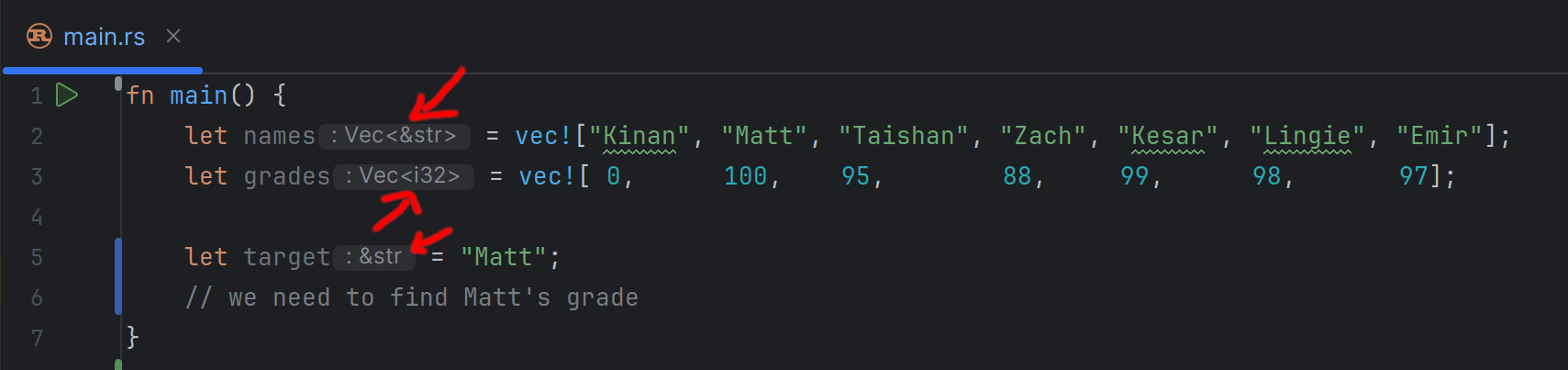
This is quite cool. Not only do we know the type of every variable, we also know information about any other elements or values inside that variable. E.g., the type of the elements inside a vector!
It turns out, we can also write these types out explicitly ourselves in the program. For example:
fn main() {
    let names: Vec<&str> = vec!["Kinan", "Matt", "Taishan", "Zach", "Kesar", "Lingjie", "Emir"];
    let grades: Vec<i32> = vec![ 0,      100,    95,        88,     99,      98,       97];

    let target = "Matt";
    // we need to find Matt's grade
}
Furthermore, if we specify types that are inconsistent with the values assigned to a variable, we will get a compiler error!
fn main() {
    // This should not work: "Kinan" is a string, not an i32.
    let target: i32 = "Kinan";
}
error[E0308]: mismatched types
  |
  |     let target: i32 = "Kinan";
  |                 ---   ^^^^^^^ expected `i32`, found `&str`
This is a consequence of an important design decision in Rust. It follows a strong static typing philosophy, where every variable (and expression) needs to have a single type that is known statically. In other words, a type that is determined at compile time before the program runs and does not change if you run the program with different inputs again.
Fortunately, Rust has support for type inference. With type inference, we do not have to write out every type in the program explicitly. Instead, we can often (but not always!) skip the types, and let the language deduce it automatically. Hence, VSCode being able to show us the types in the example above.
Now, let’s move on to the next step in the program. We need to implement a find_index function in Rust.
In Rust, function definitions (or more accurately, function signatures) look like this:
fn find_index(target: &str, names: Vec<&str>) -> usize {
  // the body of the function with all its code goes here.
  todo!("will implement later")
}
There are a few important differences between this and Python:
- Rust uses
fn(short for function) to indicate a function definition, Python usesdef(short for definition). - Every argument to the function must have an explicitly defined type in Rust. For example, we explicitly state that
targethas type&str(i.e. string). - The function must state explicitly what type of values it returns (if any). This is the
-> usizepart, which tells us that this function returns values of typeusize(Ausizein Rust is a type that describes non-negative numbers that can be used as indices or addresses on the computer).
Now, we can try to fill in the function body, mimicking the same logic from Python but using Rust syntax.
fn find_index(target: &str, names: Vec<&str>) -> usize {
    for i in 0..names.len() {
        if target == names[i] {
            return i;
        }
    }
    return "Not Found";
}
We can see a few syntax differences that we already covered earlier in class:
- Python relies on
:and indentation to specify where a code block starts and ends (e.g., the body of a function, for loop, or if statement). Rust instead uses{and}. - Rust’s syntax for ranges is
<start>..<end>, e.g.,0..names.len(), while Python usesrange(0, len(names)).
However, a deeper difference has to do with the types. The code above does not compile in Rust, and gives us the following error.
error[E0308]: mismatched types
  |
  | fn find_index(target: &str, names: Vec<&str>) -> usize {
  |                                                  ----- expected `usize` because of return type
  |     return "Not Found";
  |            ^^^^^^^^^^^ expected `usize`, found `&str`
This makes sense. We had already promised Rust that find_index would only return elements that have type usize, but then tried to return “Not Found”, a string!
We can try to change the function signature to return strings, e.g. with -> &str. However, this results in a different error: “Not found” is now OK, but return i is not, since i
is not a string (and is in fact a usize).
So, it appears as if we are in a catch-22: no matter what type we chose to specify as the return, we will sometimes try to return a value of a different type.
One quick and dirty fix is to always return usize. So, instead of returning “Not Found”, we can return some special number that indicates that the value is not found. We can try returning -1, but we will get a similar error,
since -1 is not a usize (it cannot be negative!). The best we can do is return names.len() and hope that callers manually check this value with an if statement before using it.
fn find_index(target: &str, names: Vec<&str>) -> usize {
    for i in 0..names.len() {
        if target == names[i] {
            return i;
        }
    }
    return names.len();
}

fn main() {
    let names = vec!["Kinan", "Matt", "Taishan", "Zach", "Kesar", "Lingjie", "Emir"];
    let grades = vec![ 0,      100,    95,        88,     99,      98,       97];

    let target = "tom";
    let index = find_index(target, names);
    if index < grades.len() {
        let grade = grades[index];
        println!("{grade}");
    } else {
        println!("Not found");
    }
}
This code works, although it is not an ideal approach. What if we forgot to add in the if index < grades.len() check? The program would crash with an out of range error. We will see how we can improve it next.
You can find the code for this option here.
Using Option
The main challenge we face is that find_index needs to return some special value/type to indicate not finding something, but only rarely. Rust does not let us return different types dynamically the same way Python does.
So, we need a way to let Rust understand, using types, that there are different cases that find_index may encounter and return.
Fortunately, Rust already has a built-in type that does this: the Option type.
fn find_index(target: &str, names: Vec<&str>) -> Option<usize> {
  // code goes here
  todo!("will implement later")
}
This tells Rust that find_index will sometimes (i.e., optionally) return some usize, but it may sometimes not find anything and instead return nothing. Option is a special kind of type (called an Enum, we will learn more about those later) that
can only be constructed in two ways: either, it is a None which indicates that it is empty, or it is a Some(<some value>) which indicates that it has something in it. Furthermore, following Rust’s philosophy, the type of that something is known,
in this case, usize.
If we had alternatively said Option<&str> or Option<i32> (or even Option<Option<i32>>), then the type of that something would correspondingly be a string, an i32 number, or another option that may have an i32 number in it, respectively.
Great. Now we can re-write the above function, and if we find no matches, we can return None, while if we find some matching index i, we return Some(i).
fn find_index(target: &str, names: Vec<&str>) -> Option<usize> {
    for i in 0..names.len() {
        if target == names[i] {
            return Some(i);
        }
    }
    return None;
}
This is much better!
The last thing we now need to consider is how we call find_index. Previously, we wrote let i = find_index(target, names);. Back then, VSCode would helpfully tell us that i has type usize.
Now, however, it has type Option<usize>. So we cannot use it the same way as before. For example, Rust gives us an error if we try to do grades[i], since i is an Option! Which makes sense,
what does it mean to look up a value in a list by an index that may or may not exist?
[E0277]: the type `[i32]` cannot be indexed by `Option<usize>`
  |
  |     let grade = grades[i];
  |                        ^ slice indices are of type `usize` or ranges of `usize`
Python cannot do this! Remember how it did not inform us that the index could have been None (in option 2) or a string (in option 3). In Python, we had to manually remember this fact, and manually check which case it was in the code. But because Rust knows all the types, it can remind us of this if we forget.
We can fix our code as follows:
fn find_index(target: &str, names: Vec<&str>) -> Option<usize> {
    for i in 0..names.len() {
        if target == names[i] {
            return Some(i);
        }
    }
    return None;
}

fn main() {
    let names = vec!["Kinan", "Matt", "Taishan", "Zach", "Kesar", "Lingjie", "Emir"];
    let grades = vec![ 0,      100,    95,        88,     99,      98,       97];

    let target = "tom";
    let i = find_index(target, names); // i has type Option<usize>
    if i.is_none() {
        println!("Not found");
    } else {
        let value = i.unwrap();  // value has type usize
        let grade = grades[value];
        println!("{grade}");
    }
}
Take a closer look at the following:
- We can check whether an Option is None or Some using
is_none(). - We can use
.unwrap()to extract the value inside the Option when it is Some.
This code does the job, and you can find it at here.
One reasonable question is what would happen if we use unwrap() on an Option that is None. For example, what do you think would happen if we run this code? (try running it with the Rust playground to confirm your answer).
fn main() {
    let i: Option<usize> = None;
    println!("This is crazy, will it work?");
    let value = i.unwrap();
    println!("it worked!");
    println!("{value}");
}
Our program runs, but crashes with an error midway through:
This is crazy, will it work?
thread 'main' (39) panicked at src/main.rs:4:19:
called `Option::unwrap()` on a `None` value
match Statements
The previous code is almost the ideal approach, but it suffers from one problem. We may make a mistake while checking the cases that an Option (or indeed, other types like Option) may have,
and as a result, call unwrap() when we should not, thus causing an error and a crash.
In fact, unwrap() is really really dangerous! It is almost always better not to use it.
Thankfully, Rust offers us a unique and helpful feature. By using match, we can check all the cases of an Option or similar type, exhaustively and without danger. Here is an example:
fn find_index(target: &str, names: Vec<&str>) -> Option<usize> {
    for i in 0..names.len() {
        if target == names[i] {
            return Some(i);
        }
    }
    return None;
}

fn main() {
    let names = vec!["Kinan", "Matt", "Taishan", "Zach", "Kesar", "Lingjie", "Emir"];
    let grades = vec![ 0,      100,    95,        88,     99,      98,       97];

    let target = "tom";
    let i = find_index(target, names);
    match i {
        None => println!("Not found"),
        Some(value) => {
            let grade = grades[value];
            println!("{grade}");
        }
    }
}
So, how does match work?
- You typically match on a value whose type has different cases, like
Option(more accurately, on Enums, which we will explain more in detail later in the course). - You specify the value you want to match on immediately after
match. In the above, we are matching onibecause we saidmatch i { ... }. matchhas a corresponding{and}, like a function, loop, or if statement body.- Within that body, we list the different cases that the value/type may have. These have the following shape:
<case> => <code>,- if the case has nothing in it, we can just write down its name, e.g.,
None. If it has a value, we can tell Rust to put that value in a variable for us and give it a name, for example, ifihas something in it, Rust will put it insidevalue. - the code may be a single statement (like the print in
None) or many statements (like withSome). In the latter case, we need to use{and}to specify where the code block starts and ends. - Finally, you must use
,to separate the different cases.
- if the case has nothing in it, we can just write down its name, e.g.,
In my opinion, this is the best solution we have seen. You can find it here.
Why do I think it is the best solution? Because, Rust helps us a lot when using a match statement. Specifically, if we forget a case, Rust will give us a compile error and tell us exactly what case(s) we missed.
For example, imagine we wrote this code (omitting the None case because we forgot):
match i {
    Some(value) => {
        let grade = grades[value];
        println!("{grade}");
    }
}
Rust will give us the following error (and in fact VSCode will suggest to add the fix for us!).
error[E0004]: non-exhaustive patterns: `None` not covered
  |
  |     match i {
  |           ^ pattern `None` not covered
HashMaps
The code we came up with works alright for cases where we want to look up one student’s grade. However, imagine we needed to look up the grades for several students, or to do so repeatedly.
For every lookup, we have to call find_index again and loop through all the names again. (We call this a linear time
algorithm or O(n). We will get to the details of this later.)
A HashMap gives us a much faster alternative. It allows us to look up data by a key of our choosing — so we can use the student’s name directly as the key to get their grade, without any searching. You have already seen this concept in Python, where it is called a dictionary.
In addition to having better performance at runtime, using a HashMap here will also simplify the code! We will not need to search for the target among all the names, since a HashMap provides us with a function that can retrieve a value by key (i.e., grade by name) directly!
HashMap is provided by Rust’s standard library, but we have to import it with use std::collections::HashMap;.
Creating a HashMap
We can create a HashMap and populate it all at once using HashMap::from:
use std::collections::HashMap;

fn main() {
    let map = HashMap::from([
        ("Kinan", 0),
        ("Matt", 100),
        ("Taishan", 95),
        ("Zach", 88),
        ("Kesar", 99),
        ("Lingjie", 98),
        ("Emir", 97)
    ]);
}
Each entry is a (<key>, <value>) pair. Here, the keys are student names (&str) and the values are their grades (i32).
Getting a value from a HashMap
We can retrieve a value by key using map.get(<key>). For example, map.get("Kesar").
What do you think the type of the result is? Hint: put this code in VSCode and see what it tells you!
The result is not just a number. Think about what would happen if we looked up a key that does not exist in the map,
e.g., map.get("Tom"). This is the same problem we encountered before with find_index!
The Rust developers have already thought of this: map.get(...) returns an Option. So if we have a
HashMap<&str, i32>, then map.get(...) returns an Option<&i32>2.
We already know how to handle Option types — we can use a match statement:
use std::collections::HashMap;

fn main() {
    let map = HashMap::from([
        ("Kinan", 0),
        ("Matt", 100),
        ("Taishan", 95),
        ("Zach", 88),
        ("Kesar", 99),
        ("Lingjie", 98),
        ("Emir", 97)
    ]);

    let target = "tom";
    let grade = map.get(target);
    match grade {
        Some(value) => println!("{value}"),
        None => println!("not found")
    }

    let target = "Kesar";
    let grade = map.get(target);
    match grade {
        Some(value) => println!("{value}"),
        None => println!("not found")
    }
}
What would happen in Python if you attempt to access a dictionary using a non-existing key? e.g.,
map["tom"]?
You can find the full code here.
Running and Experimenting with The code Examples
You can run most of the examples within the lecture notes directly, using the run icon at the top right corner of the code block.
You can also retrieve the code from the course’s GitHub repository and run it locally on your machine:
-
Either download the code as a zip from the GitHub repository, or clone it using git:
git clone https://github.com/rust4ds/ds210-sum26-code.git -
Open
module_5_types_and_functions/4_hash_mapfolder in your VSCode (or any of the other example folders). -
You can run and edit the code as you wish using VSCode or from the terminal!
-
Also, take a look at what types VSCode shows for the different variables, and see if you can understand why they have these types!
-
If you did not get this reference, you are missing out on one of the greatest movies of all time. Watch it. ↩
-
Do not worry about these pesky
&s for now. We will go over them later in the course. ↩