Module 13: Borrowing, Permissions, and Aquascope
Lecture 11: Thursday, June 11, 2026.
Code examples
This module looks at the following concepts:
- Why are references safe?
- Rust’s borrowing rules.
- Understanding the borrow checker through permissions.
- Visualizing references and permissions with Aquascope.
Rust References Are Safe
Let’s look at the code below that uses pointers.
pub fn helper_function(v: &mut Vec<String>) {
    for i in 0..2 {
        v.push(format!("{}", i));
    }
}

pub fn main() {
    let mut v: Vec<String> = vec![String::from("hello"), String::from("bye")];
    let e0: *const String = &v[0] as *const String;

    helper_function(&mut v);

    println!("v = {:?}", v);
    println!("At first, address of the first element was {:p}", e0);
    println!("But now, the address of the first element is {:p}", &v[0]);
    unsafe {
        println!("e0 points to {}", *e0);
    }
    println!("done");
}
Run this code and you will see that the program does not complete execution successfully (i.e., “done” does not get printed).
Instead, the program exhibits an error while running when it tries to dereference pointer e0.
Let’s break down what the code does:
- The code creates a vector with two strings inside it: “hello” and “bye”.
- The code creates a pointer
e0that points to the first element ("hello"). - The code then uses a helper function to push more strings to the vector. This causes the vector to resize and move all its contents to a bigger heap allocation (just like with
FastVecin your projects). This means that the stringhellois no longer at the old address. This is confirmed by the print statements which show the address of"hello"changing. - The code tries to dereference the pointer
e0, which is now dangling and points to the old address. This is an invalid dereference and causes undefined behavior (in this case, a “segmentation fault” error).
Now, let’s try to translate this code to use references instead of pointers.
pub fn helper_function(v: &mut Vec<String>) {
    for i in 0..2 {
        v.push(format!("{}", i));
    }
}

pub fn main() {
    let mut v: Vec<String> = vec![String::from("hello"), String::from("bye")];
    let e0: &String = &v[0];

    helper_function(&mut v);

    println!("e0 refers to {}", *e0);
    println!("done");
}
The code is very similar to the previous code. It just defines e0 as a reference (the type is &String) instead of a pointer.
We know that this reference would have the old address if we were able to run this code, for a similar reason to the pointer case above.
However, if you try to run the code, the Rust compiler would not let you. Specifically, it will give you an error telling you that you cannot mutably borrow v when the code calls helper_function, because v was already borrowed earlier when the code created e0. This is precisely why references are safe: the Rust compiler will not compile code that results in dangling or invalid references.
Important note: In general, you will often find the Rust compiler to be inflexible about borrowing. It will not allow you to compile code that you may think is natural or normal, and sometimes even safe, because it is stringent in how it applies its rules. Rest assured, however, that in most cases, it is doing that to protect you from you.
Important exercise
Researchers recently invented a visualization tool called Aquascope that can show you what would have gone wrong had the Rust compiler not rejected your code due to borrowing issues. You can find Aquascope at https://cel.cs.brown.edu/aquascope/.
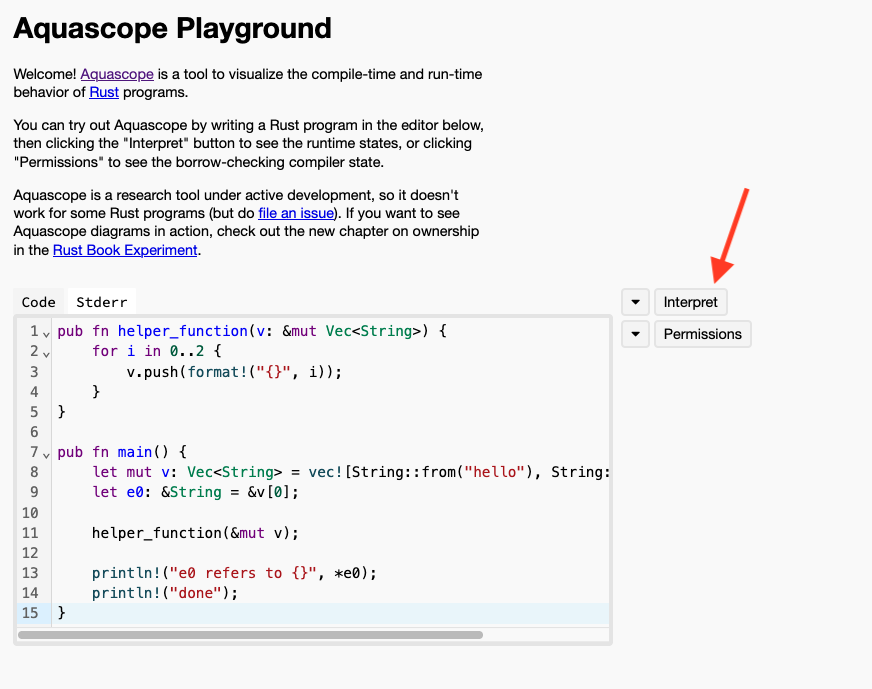
Go to that URL, and copy in the above code that uses references. Then, click on interpret. This will show you exactly what would have happened had Rust allowed you to run the code above. We will guide you through the steps one at a time.
Copy the code, and click interpret
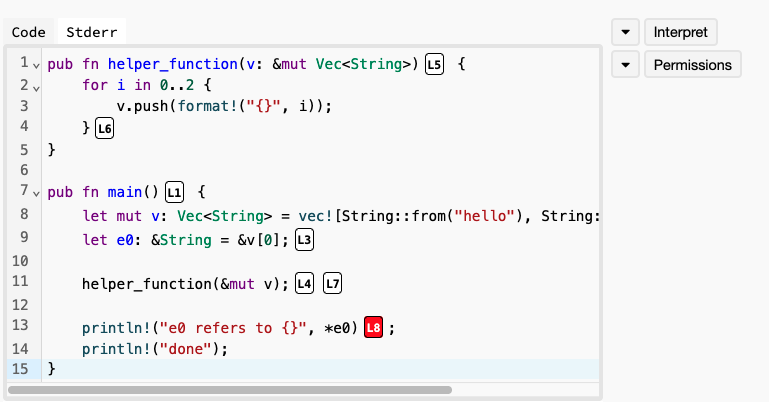
Aquascope will then visualize to you what the memory of the program looks like after each step of the execution. You will see that Aquascope will give each step in your program a name. For example, L1 (right next to the main function signature) represents when your program just starts executing at the very top of the main function, L3 represents the step when the program creates the reference e0,
and L8 represents the step when the program tries to print what e0 refers to. Notice that L8 is colored red (because it is where the dangerous error would have occurred).
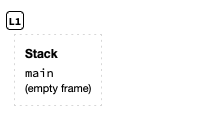
You can scroll down in the web page and you will see a visualization of the memory of the program at each step. For example, at L1, the memory is empty because the program would have just started executing.
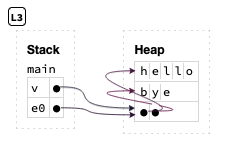
You can also see what the memory would have looked like at L3. In this case, you will see a vector v on the stack with its elements on the heap (in this case, two strings, hello and bye). You will also see a variable e0 on the stack that refers to the first element in the vector.
Finally, you can see what the memory would have looked like at L8: the vector now has more elements stored at other locations in the memory, and the reference e0 is now dangling. Aquascope explains this error in a small message above the memory visualization.
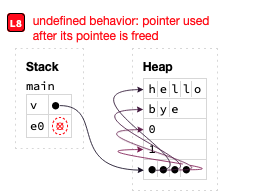
Follow the visualizations carefully one step at a time, and identify when and why the reference becomes dangling.
Borrowing Rules
So, how does Rust know when a reference is safe (and thus accept the program) and when it may be dangerous (and refuse to compile the program and give an error)?
The answer is Rust’s borrowing rules:
- Rust does not allow having more than one active mutable reference to the same data at any time.
- Rust does not allow mixing mutable and const references to the same data at the same time.
- Rust does not allow using a reference after the data it refers to has expired or was destroyed, i.e., exceeded its lifetime.
In other words, at any point in time, data may have either many active const references or exactly one active mutable reference, but never both. Furthermore, all these references must expire before the data is destroyed.
The analogy here is similar to borrowing a physical object, such as a guitar. When we create a reference to some data, we are “borrowing it”. Many of us can borrow it with const references, i.e., many of us can watch someone play the guitar. However, only one of us can borrow it with a mutable reference, i.e., only one of us can change the guitar’s tuning for example. Finally, if the data gets destroyed, the references become invalid and cannot be used, e.g., no one can play or tune the guitar anymore if someone destroys it.
The above program violates the second rule: it tries to borrow the vector twice at the same time, first using a const reference e0, then using a mutable reference when calling helper_function.
Rust checks for this as it keeps track of the duration during which a reference is active, i.e., from when it is created until it is last used.
Contrast the above code with the following one. Here, we print ref0 before mutating the vector. Rust correctly realizes that ref0 is no longer used after printing. So, it is no longer active.
This means we have no active references to v, and can mutate it by pushing.
fn main() {
    let mut v: Vec<String> = vec![String::from("str1"), String::from("str2")];
    // reference to the first element.
    let ref0: &String = &v[0];
    println!("{}", ref0);

    for i in 0..10 {
        v.push(format!("str{}", i));
    }

    println!("done");
}
Rust also does not allow having more than one mutable reference active at the same time, for the same reason. But, it allows having many const references at the same time: since none of them can modify the data, they are all safe.
fn main() {
    let mut x1: i32 = 10;
    let r1: &i32 = &x1;
    let r2: &i32 = &x1;
    println!("r1 refers to {}", r1);
    println!("r2 refers to {}", r2);
    // This code runs because all references are const.
    // Change one or both references to a mut reference
    // and see what happens!
    // e.g.,
    // let r1: &mut i32 = &mut x1;
}
Rust also ensures that the data that a reference refers to remains alive for as long as the reference is active.
Here’s a different program that violates the third rule. In this case, we borrow v using e0, then, while the reference is still active, we destroy v using drop. Try to run this code, and you will see that the Rust compiler detects this and produces an error. Specifically, the error says that the code tries to move v (to drop) while v is borrowed.
pub fn main() {
    let v: Vec<i32> = vec![20, 30];
    let e0: &i32 = &v[0];

    drop(v);

    println!("e0 refers to {}", *e0);
    println!("done");
}
Exercise: Use Aquascope to find out what would have gone wrong had Rust let you run this code.
Permissions
A great way to understand why the borrowing rules exist and why they keep references safe is to view them through the lens of permissions.
Let’s start with a really simple program.
fn main() {
    let x: String = String::from("hello");
    let mut y: String = String::from("bye");
    println!("{}", x);
    println!("{}", y);
    drop(x);
    drop(y);
}
Let us consider what permissions we have over each of the two variables above:
- We can print
x, meaning that it has read permissions to the data. Also,xowns the string, meaning that it has the permission to destroy it – we call this ownership permissions. However, we cannot edit the contents ofx, since it is not mutable, so it does not have write permissions. - On the other hand
yhas read, write, and ownership permissions.
We can confirm this using Aquascope. Copy the above code into Aquascope, and then click on permissions. We will guide you with screenshots below.
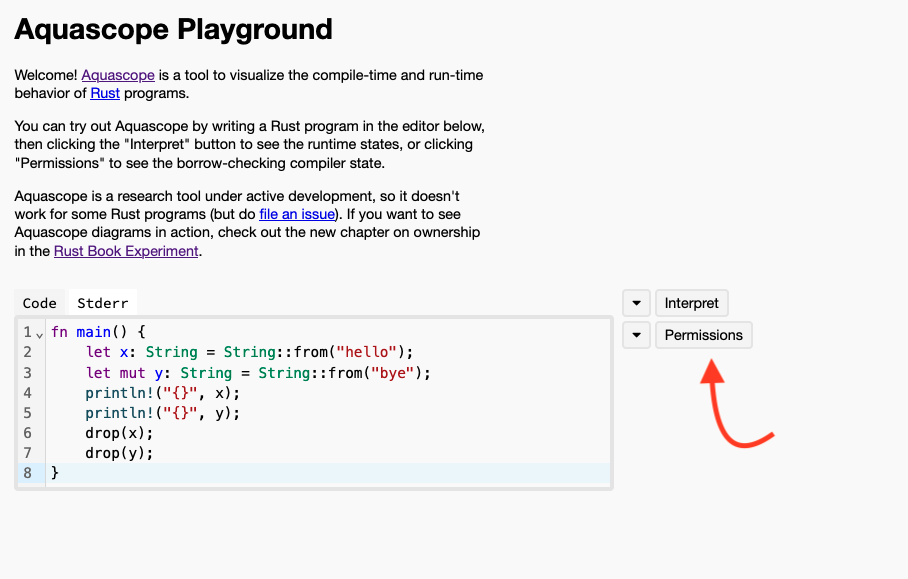
After you click on permissions, Aquascope will show the permissions associated with variables at every step of the program.
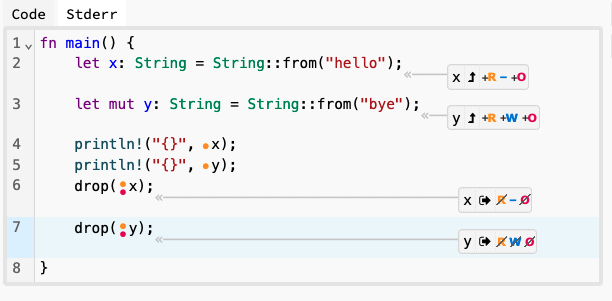
Notably, you will see that variable y has permissions R (for read), W (for write) and O (for ownership) when it is defined in the second line in the main function, while x only has R and O (and no W). At the end of the function, you will see that x loses all permissions when it gets dropped, same with y.
Let’s continue thinking with the lens of permissions looking at this next code example.
fn main() {
    let x: i32 = 10;
    x = x + 1;
    println!("{}", x);
}
What permissions does x have? We can find out using Aquascope (or by thinking a little) that the answer is R and O, and no W (because it is not mut). Looking at the next line x = x + 1, what permissions does this require from x? Well, we need to read x to add one to it, so it requires R permissions, but it also requires W. However, x does not have W!
This explains why the Rust compiler does not accept this code and produces an error! It also explains the fix, which is changing the code to use let mut x: i32 = 10;, because that change adds W permissions to x!
Permissions After Borrowing
Let’s look at this code and think about the permissions of its variables:
fn main() {
    let x: i32 = 10;

    let r: &i32 = &x;

    println!("{}", r);

    println!("{}", x);
}
Step 1: Let’s start with the first line: when x is created, we know it has R and O permissions.
Step 2: After that, we borrow x and create a reference r to it. Let’s think about what impact this has over its permissions:
rhas read permissions to the data that it refers to (i.e. tox). Aquascope describes this using*r, which we know is the Rust operation for dereferencing. So,*rhasR.*rdoes not haveWpermissions since this is not a mutable reference.*rdoes not haveOpermissions: the reference merely refers to the value10and does not own it!
This makes sense but is not the whole picture: when we create r, we also change the permissions of x:
- We can still read
xand borrow it with const read-only references, soxstill hasRpermissions. - However, since we have an active reference
rthat refers to it, we can no longer destroy this data, soxloses itsOpermissions!
This explains why we would not be able to move or drop x while reference r is active: we no longer have that permission! Try it: add a drop(x) in between defining r and printing it, and see what error the Rust compiler will give you!
Step 3: So far so good. What about after we print r? Well, now the reference is no longer active since we are done using it. Meaning that:
*rloses all its permissions.xis no longer actively borrowed, thus, it regains itsOpermissions.
Step 4: Finally, after x is printed and goes out of scope, x is destroyed and loses all its permissions as well.
Aquascope confirms all this for us, as you see below.
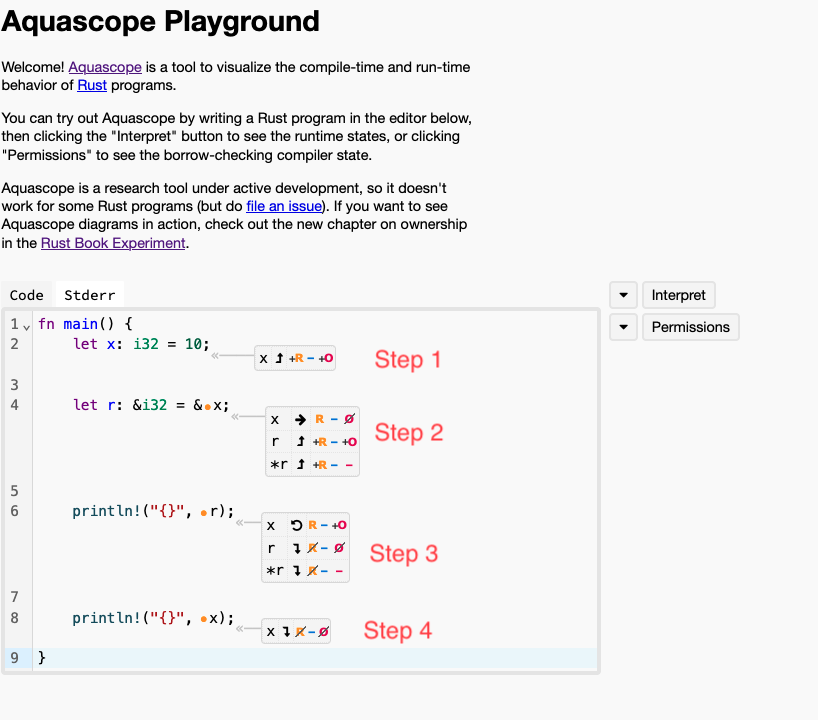
Note that Aquascope also shows permissions for r as well as *r. This is not really meaningful – it is simply an indication that r owns the address stored inside of it (i.e., the reference itself), but not the data it refers to.
Permissions After Mutable Borrowing
Let’s make the code mutably borrow x.
fn main() {
    let mut x: i32 = 10;

    let r: &mut i32 = &mut x;

    println!("{}", r);

    println!("{}", x);
}
Let’s think about the permissions again:
xstarts withR,W, andO.- When we create
r,*rgetsRandWpermissions (but obviously notO). At the same time,xlosesRpermissions – remember that Rust will not allow us to mix mut borrows and const borrows so we can no longer readx. Furthermore,xalso losesWpermissions: we cannot modify it anymore as Rust only allows one active mutable borrow at a time. It also losesOpermissions since Rust will not allow us to destroy it whileris active. *rloses all permissions afterrexpires, andxregainsR,W, andO.xloses all permissions after it is done.
Exercise: confirm this using Aquascope!
Now, let’s look at one last example.
fn main() {
    let mut x: i32 = 10;

    let r: &i32 = &x;

    println!("{}", r);

    println!("{}", x);
}
In this case, x is defined with mut, so it starts with R, W, and O.
What about r? It is a regular reference, but it refers to mutable data! Do you think *r would have W permissions?
Furthermore, when we create r, x becomes actively borrowed! Does x lose any permissions? If so, which ones and why?
Use Aquascope to find the answers to the above questions and try to understand why! Refer to the borrowing rules above for help.
Exercises
To make sure you fully understand the topics in this module, try to solve these exercises. For each exercise, you must do the following without running the code or using VSCode:
- First, figure out what permissions the variables and references have at various steps of the program.
- Determine whether Rust would allow the program to compile or not! The answer to this question is the same as whether the program abides by the three borrowing rules, i.e., whether the permissions of the variables and references match how the program uses them.
- If the program violates the borrowing rules or permissions, think about what would happen if Rust allowed it to run: will it cause some undefined or dangerous behavior? How and why?
We will ask you similar questions on the exam! So, try to solve the questions using a pen and paper (or a text editor without IDE or Rust compiler support).
After you finish an exercise, you can check your answers by:
- comparing the permissions you come up with to what Aquascope shows for each program.
- running the code using the playground and seeing if the Rust compiler accepts it or gives an error.
- using the
interpretfeature of Aquascope to find out if there will be dangerous or undefined behavior had the Rust compiler accepted the program.
Exercises:
- Exercise 1: https://play.rust-lang.org/?version=stable&mode=debug&edition=2024&gist=fe1469af8c9d0016d018f8ea3076dc1f
- Exercise 2: https://play.rust-lang.org/?version=stable&mode=debug&edition=2024&gist=9ff4b51730f4932fdcba4a494c1da0db
- Exercise 3: https://play.rust-lang.org/?version=stable&mode=debug&edition=2024&gist=4e8b2f18def78fd48140775a44cf88f2
- Exercise 4: https://play.rust-lang.org/?version=stable&mode=debug&edition=2024&gist=b342f85ba6ea74f0d764dfd41b155103
- Exercise 5: https://play.rust-lang.org/?version=stable&mode=debug&edition=2024&gist=e8d928a708af78ff6adac2cf44d6a224
Hint: Exercise 4 has a trick question ;)
Teaser: Lifetimes
The third borrowing rule above mentioned that a reference cannot be used after the data it refers to has exceeded its lifetime. In the next module, we will study lifetimes directly: how the borrow checker tracks how long each reference stays valid, and how we can annotate lifetimes ourselves when the compiler needs our help.