Module 13: Managed Memory in Python
Lecture 30: Monday, April 13, 2026, and
Lecture 31: Wednesday, April 15, 2026.
Code examples
In this module, we will learn about alternative approaches to ensuring memory safety in other languages.
Recap: Memory Safety The Rust way
Rust ensures programs are memory safe by rejecting to compile programs that are not safe, e.g., have dangling references:
- Rust provides programmers with a lot of control over the program memory with features like ownership and references.
- This control can be misused, e.g., a developer that destroys a variable by mistake while it has active references.
- Rust uses ownership (e.g., the permissions we discussed earlier using aquascope!), borrowing, and lifetimes to detect any such scenarios and produce compile errors asking the programmer to fix them.
This approach is unique to Rust, it combines giving the programmer control with memory safety and does not require any checks at runtime – everything is done by the borrow checker at compile time. This results in really fast programs.
Here is a simple example to refresh your memory:
fn main() {
    let x = String::from("hello");
    let ref_to_x: &String = &x;
    drop(x);
    println!("{}", ref_to_x);
}
The C++ Way
C++ is a very popular compiled programming language whose syntax and features are similar to Rust in many ways. It also provides programmers with complete control over the program’s memory.
However, unlike Rust, it does not have a borrow checker. It does not have lifetimes, and its notion of ownership is wacky. C++ programmers commonly use raw pointers that they have to track and manage themselves. Crucially, they have to ensure they do not cause memory issues by mistake, for example, by destroying data that has active pointers. If they do, the C++ compiler will not detect it, and their programs will misbehave at runtime in arbitrary and difficult to debug ways!
C++ is very performant and provides programmers total control and even more flexibility than Rust does, but this also includes the flexibility to shoot themselves in the foot, by writing incorrect and terribly unsafe code, if they aren’t careful.
To an extent, you can imagine that writing C++ code is similar to writing Rust code where the entire code is inside an unsafe block. For example, something like this:
fn main() {
    unsafe {
        let x = String::from("hello");
        let ptr = &x as *const String;
        drop(x);
        println!("{}", *ptr);
    }
}
Managed Memory: the Python Way
An alternative approach to Rust is for the language to take away the ability of the programmer to manage and control the memory. Instead, the language manages the memory on their behalf!
This is a very popular approach: it results in programming languages that are simple to use and learn, but comes at the expense of reducing the programmers ability to control what’s going on, and at the cost of high performance overheads.
Python is a great example of such a language: It is very easy to use and learn, but is many times slower than Rust for many tasks!
Let’s dive deep into how Python manages the memory.
How does Python Pass Arguments to Functions
Let’s start by figuring out how Python passes arguments to functions. Look at the below python sample.
# Is l1 passed to l2 by move, clone/copy, or ref?
def helper(l2):
    l2.append(3)
    print('l2', l2)


l1 = [1, 2]
helper(l1)
print('l1', l1)
In Rust, there are three ways of passing a value to a function:
- by move
- by copy/clone
- by ref (const or mut).
Let’s think about what would happen if Python passes l1 to helper using each of these approaches:
If it passes by move then l2 should print 1, 2, 3 and l1 should not print anything (or print some error). Since, in this hypothetical, we would have moved (and thus lost access to) l1.
If it passes by copy/clone then l2 would print 1, 2, 3 and l1 would print 1, 2. l1 would not be affected at all by anything that happens in helper!!
If it passes by ref then l2 and l1 would both print 1, 2, 3.
We just enumerated three hypotheses, and made predictions about what the code will do in each of them. Now, we can run the code, find out which of the predictions is true, and eliminate all the wrong options to find out what Python does. Science!
You can find this code (and all other Python samples from these notes) in our code repo. Get the code and run it using python and see what happens!
Spoiler: the output is:
l2 [1, 2, 3]
l1 [1, 2, 3]
So, Python passes arguments by (mutable) reference.
Detour: Tradeoffs
Python passes by reference by default because passing by reference is cheap: it does not copy the data!
However, the down side is that a function may mutate and corrupt data that other parts of the code needs. Thus, programmers must manually copy such data before passing it to functions, to ensure the original data remains unmodified.
For example:
# Is l1 passed to l2 by move, clone/copy, or ref?
def helper(l2):
    l2.append(3)
    print('l2', l2)


l1 = [1, 2]
tmp = l1.copy()
helper(tmp)
print('l1', l1)
In this case, tmp is still passed by reference, but tmp itself is a copy of l1. So l1 remains unmodified!
Note: Python has two notions of copies: a shallow copy (which is what we did above) and a deep copy (which is similar to a clone in Rust). You can read more about this if you are interested here.
Everything in Python is a reference!
In fact, everything in Python is a reference!
If you run the code below, you will notice that both x and y are printed as [1, 2, 3, 4, 5]!
Because they are both references to the same list! So, when we modify one, we also modify the other!
# x and y both refer to the same list!
x = [1, 2, 3]
y = x

# so, if x is modified, y is affected!
x.append(4)

# and vice versa!
y.append(5)

# We can see both modifications!
print(x)
print(y)
In fact, we can prove this by printing the addresses of x and y!
# Helper function that gives us the address of the data
# that a variable refers to
def address(var):
    return hex(id(var))

# x and y refer to the same address!
print(address(x))
print(address(y))
Alright, if everything is a reference, then:
- who owns the data? how does Python knows when to delete the data!?
- how does Python ensure none of these references become dangling!?
It turns out, Python more or less does not allow the programmer to delete the data. All that the programmer can do is delete a particular reference. Python internally keeps track of how many active references refer to the data. When that count hits 0, Python deletes the data.
In other words, all the references share the data, there is no single owner! This also means that as long as one reference to some data is active, the reference count remains above 0, meaning the data is guaranteed not to get deleted, and the reference won’t dangle!
import sys

# Print 3: x is one reference, y is one reference
# and we created one more reference when we passed
# y to sys.getrefcount() -- remember, python always
# passes by reference!
print(sys.getrefcount(y))

# Delete variable y, somewhat similar-ish to drop(y)
# in Rust.
del x

# refcount is now 2 because y is gone!
print(sys.getrefcount(y))
print(y) # the data remains!
This is a lot simpler to think about than Rust’s ownership, lifetimes, and borrow checking. Yet, it guarantees memory safety just the same. The downside is it requires:
- keeping tracking of and updating the refcount: which takes time and memory.
- programmers need to remember to copy data when they need to.
- if programmers need to ensure that some piece of data (e.g., sensitive secrets) are truly deleted, they need to make sure they got rid of all references to it from anywhere in their program.
Cycles and Garbage Collection
There is also one more down side! Cycles.
For example, consider this python code:
x = [1, 2, 3]
x.append(x)
x.append(x)
print(x)
We created a list x that contains 1, 2, and 3. Then, we appended the list x to itself.
This seems circular and impossible, however, remember that in Python, everything is a reference.
So in reality, all we’ve done is appended a reference (i.e., an address) to the list, that happens to refer back to the list itself. We do this twice.
In other words, the list in memory looks something like the graph below. Notice the two circular references from inside the list to the list itself!
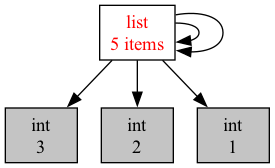
So, what do you suspect refcount will print for x?
print(sys.getrefcount(x))
That’s right! 4. x is one reference, there are two cyclical references inside x itself that refer back to x, and we created one more reference when calling getrefcount.
So, let’s say we deleted x (or that it went out of scope and became inactive). How many references
to the list would still exist?
del x
Well, we got rid of one reference, and the reference we created when calling getrefcount earlier is gone. But we still left two references inside the list. So the refcount is now 2!
However, these are meaningless references: our code has no way of using them or accessing the list. This happened because the list itself is cyclical and refers to itself, and not because it is still in use.
So, even though the list should in principle be deleted now. Python cannot delete simply based on refcount, since the refcount is not 0!
It turns out, these kind of cyclical reference chains are pretty popular (e.g., a doubly linked list!). So, Python must find some way to deal with them, or risk running out of memory.
This is where the garbage collector comes in: this is a component in the Python runtime – the part of the Python language that is attached to your Python program and runs it (and does all the work of managing the memory, the references and refcounts, etc).
The garbage collector looks at the memory of the program, and identifies any data that is no longer reachable from active variables in the program, including cyclical data like x above. It then deletes any such data, while keeping the rest in place.
We can call the garbage collector manually (this is not recommended and is only for demonstration).
import gc
print('Garabage collected', gc.collect())
Since we ran del x before, the list is now cyclical garbage. The garbage collector finds it and deletes us. The garbage collector counts the entire cycle as one data element.
This ensures that Python can delete any inactive data (so it does not run out of memory) while ensuring that no active data gets deleted prematurely, and thus deletion does not create dangling references.
It is also very slow! Garbage collection is an expensive and complicated process that requires traversing the various objects in memory and identifying if they are still active or merely cyclical. Making garbage collection as fast as it can be has been a long standing goal in programming languages research. Over the last 30-40 years, we have seen countless papers and systems that aim to improve it.
It’s gotten a lot smarter – but it is still very slow.
Python invokes the garbage collector periodically, when certain memory usage limits are met. When it does, your program will likely freeze for many many CPU cycles, until it is done collecting garbage.
You can read more about garbage collection in Python here.
How do Lists/Vectors Work in Python?
We saw how Python ensures that we cannot have dangling references because of data getting destroyed too early. However, we know that dangling references can also occur due to other reasons. For example, if the data being referred to moves to a different address in memory, the old reference may dangle!
We’ve seen examples of this with unsafe raw pointers in Rust. For example, imagine we have a raw pointer to an element in a vector. If we then push some more elements to the vector, the vector may resize (doubling its capacity), which moves all its elements to a different, bigger location in memory, and the old raw pointer becomes dangling.
Rust references protect against this by using Rust’s permissions. They lock the vector by removing write permissions if has been borrowed. This means a vector can not resize or move its elements while any of these elements are actively borrowed.
Let’s look at what Python does:
v = ["hello", "goodbye"]
x = v[0]
We created a Python list (which is the same as Vec in Rust). The list contains two elements: “hello” and “goodbye”. Then, we created a variable x and assign it to the first element in the list v[0].
We know that in Python, everything is a reference! So, x is merely a reference to the string hello. We can confirm this by looking at their addresses!
# Both of these addresses are the same!
print(address(v[0]))
print(address(x))
Now, say we push more strings to the list:
for i in range(10):
    v.append("this is a new string")
In principle, v should now resize to a much bigger capacity, and its elements should be moved to the new memory location.
So, the address of v[0] should now be different, and if x still had the old address, it might dangle.
Let’s see if we can confirm this:
print(address(v[0])) # same address as before!
print(address(x))    # same address as before!
print(x)  # this prints hello: x does not dangle!
If you run this code, you will notice that the address of x and of v[0] does not change! How come?
Well, in Python, everything is a reference. This includes elements inside a vector/list! The list does not store the elements in its heap allocated memory. It merely stores references to the elements – the elements themselves are stored in some arbitrary place in memory (also on the heap). So, when the list resizes, it moves the references to a newer, bigger location in memory. But the elements themselves remain in place.
In other words, it looks a little like this:
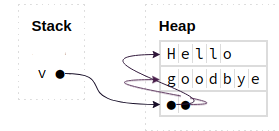
This means that in Python, we can modify lists without worry, even if we have active references to their members!
Let’s think about the advantages and disadvantages of this approach.
Advantages
-
This is simple for programmers to use: Programmers can modify lists as we see fit without worrying about having active references or causing dangling pointers! In fact, they can (almost) forget how memory works and still be able to use lists correctly without causing any dangling pointers.
-
Python can support lists that contain elements of different types and sizes: regardless of what the element is, all that is stored inside the list are references, which all have the same size (traditionally, 8 bytes). So, it is easy for python to know how to retrieve an element at index i from a list (e.g.,
v[i]), even for largei. It can simply go to the address of the ith element (which would be at an offset equal to 8 * i), and then follow the reference there.
Disadvantages
-
This approach is slower: it results in an extra dereference for every element access. E.g., to access
v[0], python has to follow the pointer insidevto the address of the first slot in the heap-allocated memory of that list, and there, python will find another reference that it has to dereference to get the actual element. In Rust, the second step is unneeded, the element is directly at the first slot. -
The approach is even slower: because it means that the elements are actually not contiguous in memory. Their references inside the list are contiguous, but the elements may be all over the place. This changes the pattern of memory accesses of even a simple for loop that goes through a list one element at a time. The loop will end up accessing elements all over memory. This has a significant negative impact on the performance of the program, since it is very unfriendly to how modern computers cache memory accesses.
-
What does it mean to copy a python list? The elements are not stored in the list, but elsewhere on the heap, with only a reference in the list. So, if we copy a list, do we simply copy the references of the elements (but still point to the same elements) or should we copy the elements themselves as well? This is the key difference between shallow and deep copy in python. Run the code below using Python on your computer and try to make sense of the output!
import copy

x = [ [1, 2], [10, 20] ]
v1 = x.copy()          # shallow copy
v2 = copy.deepcopy(x)  # deep copy

# x is not affected by adding new elements to v1 or v2.
v1.append('hello')
v2.append('goodbye')
print(x, v1, v2)

# but, x is affected if we modify the elements within v1.
# a shallow copy has references to the same elements!
v1[0].append(3)
print(x, v1)

# on the other hand, a deep copy is complete isolated
# as it copies the elements and stores new references to
# the copies.
v2[0].append(4)
print(x, v2)