Computer Memory
Lecture 12: Friday, February 20, 2026, and
Lecture 13: Monday, February 23, 2026, and
Lecture 14: Wednesday, February 25, 2026, and
Lecture 15: Friday, February 27, 2026.
The important concepts we will learn in this module:
- Bits and bytes
- Addresses
- Stack vs Heap
- Allocation, deallocation, and scopes
Motivation
Look at the following program. Feel free to run it using the run icon in the top right corner of the snippet.
fn main() {
    let x1: i32 = 10;
    let x2: i32 = 20;
    let y: i32 = x1 + x2;
    println!("{y}");
}
This program is really simple: it stores two values, 10 and 20, inside to variables named x1 and x2, both of type i32. It then computes the sum of both and stores it in a variable called y, also of type y. Finally, it prints the value of variable y.
Imagine if you were going to perform this computation the old school way, on a pen and paper without a computer. You would do something like:
- Write down 10 and 20 on the piece of paper, perhaps on top of each other (long addition style)
- You would then do some thinking and add the numbers together, perhaps digit by digit writing down each digit.
- Eventually you will end up with the final answer, 30, written out on a piece of paper.
Crucially, this process required you to write down and operate over different numbers. In other words, you used the paper to store the values. If you had many numbers that you had to deal with (e.g., a balance sheet), you might even given each of these number a name (e.g., balance, revenue, etc), and write that name down next to the number (e.g., in a table or schedule).
The computer executes the program above in a surprisingly similar way to the pen and paper approach! Specifically,
- The computer stores 10 and 20 in its memory.
- The computer retrieves 10 and 20, adds them up (using some process that is quite similar to long addition) and writes the output, 30, to its memory.
- The program writer uses names, such as x1 and x2 (or balance and revenue), to refer to these values and operate on them.
In this analogy, the program memory behaves like the pen and paper, and the variable name behaves like the label, name, or title that we give to the numbers on the piece of paper. In many ways, a computer program is nothing more than a sequence of instructions that tell the computer to store data elements, give them names, and operate on them to produce new data elements, etc.
The pen and paper analogy is surprisingly effective: imagine we kept operating on these numbers and creating new ones for a really long time, eventually, we would run out of paper! Similarly, a computer program that runs for a very long and continually produces new data would eventually run out of memory. Thus, it is crucial that the computer and programmer can free up memory that is no longer needed, a kin to how you would use an erased to get rid of some old numbers on the piece of paper to make space to write down new ones.
Bits and bytes
One major difference between the pen and paper analogy and the computer memory is that computers (and their memory) does not write down numbers (or strings) the way we do on a piece of paper. Instead, they store values in binary encoding using bits. A bit is a single digit that can either be 0 or 1. It turns out we can represent any value you could think of using just bits in binary encoding. Here’s some examples:
the number 0 ====> 0 in binary
the number 1 ====> 1 in binary
the number 2 ====> 10 in binary
the number 3 ====> 11 in binary
the number 4 ====> 100 in binary
the character 'A' ==> 1000001 in binary (using ASCII encoding)
The exact details of how values are encoded in binary using bits is not important for us. What is important is that this encoding exists and is used by the computer. If you are curious, feel free to read more about binary numbers and ASCII encoding for strings.
The most basic unit of memory on a computer is a byte, which is made out of 8 bits. For example, these values are all 1 byte long:
00000000 ===> value 0
00000001 ===> value 1
00000101 ===> value 5
11111111 ===> value 255
In Rust, both i8 and u8 are numeric types that are one byte long. E.g., they represent numeric values that fit in 8 bits.
u8 is for 8-bit long non negative numbers, which range from 0 to 255 inclusive. Values bigger than 255 need more than 8 bits
and thus would not fit inside a variable of type u8. Similarly, i8 represents signed 8-bit long numbers between -128 and 127. Values
outside that range similarly would not fit in 8 bits and thus won’t fit inside an i8.
fn main() {
    println!("u8 values are between {} and {} inclusive", u8::MIN, u8::MAX);
    println!("i8 values are between {} and {} inclusive", i8::MIN, i8::MAX);
}
Rust similarly has types i16 and u16 (16 bits or 2 bytes long), i32 and u32 (32 bits or 4 bytes long), and i64 and u64 (64 bits or 8 bytes long). Each of these can fit larger and larger values but require more and more space to store.
The smallest unit of space on modern computers is one bytes. This means that values of a type that is logically smaller than a byte, still take up a whole byte of storage. For example, bool can only store true or false (i.e. 1 or 0), and thus could have been as small as a single bit, but it still takes a whole byte (8 bits) on the computer.
fn main() {
    println!("size of i8 is {} bytes", size_of::<i8>());
    println!("size of u8 is {} bytes", size_of::<u8>());
    println!("size of i32 is {} bytes", size_of::<i32>());
    println!("size of u32 is {} bytes", size_of::<u32>());
    println!("size of bool is {} bytes", size_of::<bool>());
}
Computer Memory
So, where does the computer store all these bits and bytes? It turns out, the computer has a hierarchy of storage:
- Hard Disk Drive (HDD) or Solid State Drive (SSD): this is where your computer store your files, such as games or word documents. On modern computers, this is often in the 100s of Gigabytes or even Terabytes. A gigabyte is roughly 1 billion bytes (1 with 9 zeros next to it).
- Random access memory (RAM), sometimes called main memory or just memory: this is where the computer stores all your program variables (numbers, vectors, etc). RAM is often a few Gigabytes (e.g. 8 or 16).
- CPU caches and registers: these are a lot smaller and is where the computer stores values as it operates on them directly (e.g. right when it has to add two numbers). These are not important for this course.
Reading data from a hard drive or SSD is several orders of magnitude slower than reading it from RAM. However, hard drive and SSDs are a lot cheaper (per gigabyte) than RAM. They are also persistent: if you shutdown your computer then turn it on again, you retain all of your files on the hard drive, but lost everything on your RAM!
When we talk about memory in this course, we mean RAM.
So, what does the RAM look like? You can think of RAM is a long strip made out of cells that are each one byte long. In other words, a cell in the RAM would perfectly fit an i8 or u8. On the other hand, an i32 or a u32 would need 4 cells in RAM.
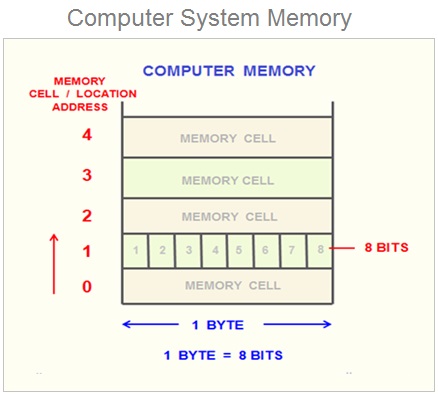
Source: https://www.learncomputerscienceonline.com/what-is-computer-memory/
Because RAM is usually several gigabytes in size, it means that it contains a ridiculously large number of cells, upwards of several billions. Thus,
the computer needs a way to refer to different cells. These are called addresses and in many ways, they work like human addresses.
Imagine the BU campus had a really long road, let’s call it RAM Rd, that has billions of house. The first house would have address 1 RAM Rd, Boston, MA. 02215. The second house would be 2 RAM Rd, Boston, MA. 02215, and so on.
Memory addresses follow the same concept (except, we would not need a road name, city/state, or a zip code). The first cell would have address 0, the second cell would have address 1, the third cell would have address 2, and so on. Because RAM is so big, these address can get quite big. Thus, address on modern computer can be up to 8 bytes (64 bits) in size. In rust, they are often represented using type usize.
fn main() {
    println!("Addresses are {} bytes in size", size_of::<usize>());
    println!("They can range between {} and {} inclusive", usize::MIN, usize::MAX);
}
We can confirm this by asking Rust and the computer to show us the address of a variable. Note that because addresses can get really big, Rust prints them in hexadecimal form.
fn main() {
    let x: u8 = 10;
    // {:p} instructs Rust to print in address form.
    //      the p stands for pointer, which we will learn about later.
    // &x   asks Rust to give us a pointer/reference/address for x.
    //      we will learn more about pointers and references later.
    println!("x has address {:p}", &x);
}
The Stack
Run the following program and look at the output addresses.
fn main() {
    let x1: u8 = 10;
    let x2: u8 = 20;
    let x3: u32 = 30;
    let x4: String = String::from("welcome all to DS 210!");
    println!("Address of x1 {:p}", &x1);
    println!("Address of x2 {:p}", &x2);
    println!("Address of x3 {:p}", &x3);
    println!("Address of x4 {:p}", &x4);
}
We can see the following observations:
- The addresses are ordered: x1 has an earlier (smaller) address, then x2, then x3, then x4.
- x2’s address is one away from x1. Remember that the smallest unit of memory (a cell) is one byte in size.
This means that x1 takes up one byte, followed immediately by x2. This is expected because, x1 has type
u8. - x3’s address is similarly one byte away from x2, as x2 is also a
u8. - x4’s address is 4 bytes away from x3! This is because x3 is a
u32, which requires 4 bytes (thus 4 cells) in memory.
By default, variables in Rust are stored on the stack. The stack is quite nice to use for us programmers:
- It has fast allocation and de-allocation
- It is completely automatic: Rust and the computer automatically figure out where to store new variables and when to free them or get rid of them to save space.
- It is simple to understand because it follows the LIFO principle: Last in First out.
Crucially, each variable or piece of data that Rust stores on the stack needs to have a fixed and known size. So that Rust knows how far away the next variable or value should be from it. This means that data with an unknown size or a size that can change dynamically, cannot be stored on the stack!
The heap
Let’s look at the following code:
fn main() {
    let x1: i8 = 10;
    let mut s1: String = String::from("hello");
    let x2: i8 = 20;
    println!("address of x1 {:p}", &x1);
    println!("address of s1 {:p} and size of s1 {}", &s1, size_of::<String>());
    println!("address of x2 {:p}", &x2);
}
You can see that s1 appears to be stored in the stack, between x1 and x2. You can also see that s1 is 24 bytes in size.
However, the contents of a string is dynamically adjustable, e.g., we can add more characters to it. If the strings contents were stored on the stack, this could create a problem: new variables (such as x2) may be stored immediately following s1 on the stack, meaning that we
would not have any free space or room to add more elements to the string. Alternatively, if we try to reposition s1 to the end of the stack, e.g., until after x2, we would create a gap of empty but unusable space where s1 used to be and violate LIFO.
As a result, we need a different approach for such dynamically resizable data! Look at the output of this code:
fn main() {
    let x1: i8 = 10;
    let mut s1: String = String::from("hello");
    let x2: i8 = 20;
    println!("address of x1 {:p}", &x1);
    println!("address of s1 {:p} and size of s1 {}", &s1, size_of::<String>());
    println!("address of x2 {:p}", &x2);

    s1.push_str(" everyone!");
    println!("address of s1 {:p} and size of s1 {}", &s1, size_of::<String>());
    println!("{s1}");
}
Notice the following:
- When we print s1, we see the modified string “hello everyone!”.
- At the same time, the address of
s1remains unchanged. - Furthermore, the size of
s1remains unchanged (24 bytes)!!!!!
This seems wrong! How could the size of the string remain the same even though we just made it a lot longer than it was before?
Well, this is because a string in Rust actually consists of 3 components: the length of the string (the number of characters in it), the
capacity of the string (how much empty space is currently available for the string to grow into), and the address (or pointer, ptr for short) of where the characters of the strings are actually stored! It does not contain the characters of the string
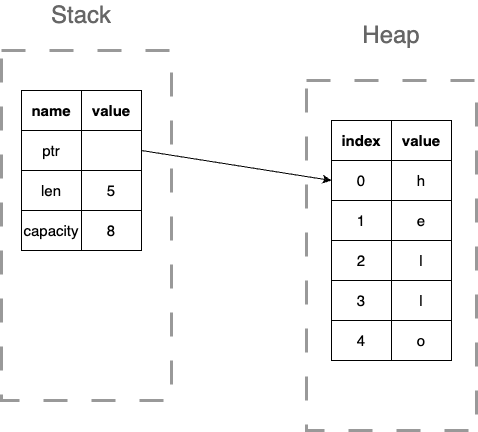
The characters are actually stored in a different part of memory, called the heap:
- Allocation and deallocation to the heap is slower than the stack.
- Heap allocations does need to have a fixed size.
- Heap memory can be allocated and deallocated in any order and not only LIFO.
This allows String to have the best of both words: it has a known and fixed size on the stack, allowing Rust to deal with variables of type string
easily, including automatically adding or removing them from the stack using LIFO. At the same time, it means that the characters of the
string can be dynamically modified and resized, as they are stored on the heap. However, this means that the code of String would need to
manually manage the heap memory, including when to allocate it, when to free it, when to resize it to a new size and move over characters to it,
etc.
Strings are not the only type that behaves this way: any type that deals with dynamic, resizable data must also allocate, manage, and free its own heap memory. This include Vec, HashMap, HashSet and many many other types. You will have hands-on experience with what this entails when you implement FastVec in project 1!
fn main() {
    let mut v1: Vec<i8> = vec![5, 4];
    println!("address of v1 on the stack {:p}", &v1);
    println!("address of first element of v1 (on the heap) {:p}", &v1[0]);
    println!("address of second element of v1 (on the heap) {:p}", &v1[1]);
}
Scopes
It turns out that every variable in Rust has a scope: this represents a portion of the code where the variable is active and can be used (called in scope). Outside of this portion, a variable is inactive and cannot be used (out of scope).
Rust variables take on the scope of the blocks of code they are defined in. For example, run the code below, then edit it to see what happens if you use variables when they go out of scope!
fn main() {
    // x1 is in scope until the end of the main function.
    let x1: i8 = 10;
    if x1 > 5 {
        // x2 is in scope inside this if branch,
        // it cannot be accessed outside of it.
        let x2: i8 = 20;
        println!("{x2}");
    }

    println!("{x1}");
    // try to print x2 here, what do you see?
    // println!("{x2}");

    for i in 0..3 {
        // x3 is in scope inside the for loop body,
        // it cannot be accessed outside of it.
        let x3: i8 = 30;
        println!("{x3}");
    }

    // try to print x3 here, what do you see?
    // println!("{x3}");

    {   // you can use curley braces to define your nested scope!
        // x4 is in scope within these curley braces!
        let x4: i8 = 50;
        println!("{x4}");
    } // end of scope for x4

    // try to print x4 here, what do you see?
    // println!("{x4}");
}
Because a variable cannot be used after it goes out of scope, that means that Rust can erase that variable from memory (and specifically, the stack) to save space! Furthermore, it may chose to reuse that space for a different new variable later.
This gives us the LIFO behavior of the stack: a variable defined later in a program cannot have a bigger scope than an active in-scope variable defined before it. Thus, the later variable will be erased or freed first! To convince yourself of this fact look at the above program. Say we are inside the for loop: there are two active variables, x1 and x3. Notice how x3, which was defined later, goes out of scope earlier than x1.
Furthermore, if a type manages some heap memory, such as Vec or String, it can provide code to free up or deallocate that memory that Rust can automatically invoke when the variable goes out of scope. This is why in Rust, we view variables or values as owning their heap memory and resources.
struct SimpleExample {
    // imagine we have some resources on the heap
    // ptr_to_heap: *mut i32,
}
// We can define our own destructor that tells Rust
// how to free/deallocate the heap resources
impl Drop for SimpleExample {
    fn drop(&mut self) {
        // free(self.ptr_to_heap);
        println!("destructor called!");
    }
}

fn main() {
    let x1: SimpleExample = SimpleExample {};

    {
        let x2: SimpleExample = SimpleExample {};
        println!("address of x2 {:p}", &x2);
    }

    println!("After curley braces");
    println!("address of x1 {:p}", &x1);

    println!("Right before main is over");
}