Homework 3: Guessing Game
In this homework, you will:
- Implement different strategies for solving “the guessing game”.
- Write tests to ensure your strategies are correct.
- Evaluate which strategy performs better in the worst case.
The Guessing Game
The game is pretty simple. The user (you!) is the challenger player: they select a random number and write it down. The computer then tries to guess the number by asking the user a series of questions. The goal of this game is to:
- Write a computer strategy that guesses the number correctly.
- Have the strategy reach this guess while only asking a small number of questions.
Here are the important concepts in this game:
The number: the target number the computer must correctly guess.The player: the entity that chooses the target number and answers questions about it. This is usually the user (you!).The strategy: the program the computer follows to guess the number. The strategy can chose to try different options and ask the player questions about them.The guess: the final answer the strategy returns, which should be equal tothe number.# of steps: how many questions the strategy needed to ask the player before returningthe guess.
Provided Code
We provide you with a lot of scaffolding code for the game as well as some examples. The provided code is under homework_3_guessing_game in our course’s GitHub repo https://github.com/rust4ds/ds210-sp26-a1-code
The code has the following structure:
src/game.rs: This is the main file for playing the game. It initializes the player and strategies, and prompts the user with instructions. You do not need to read or understand this code to complete the assignment.src/strategies.rs: This file contains two provided strategies. We suggest reading and understanding lines 15-35.BadStrategy: This strategy checks if the number is the smallest number in the range, otherwise, it just assumes it is the maximum. This is a bad and incorrect strategy that cannot guess most numbers!RandomStrategy: The strategy chooses a potential guess at random, asks the user if it is correct, and repeats until it finds the number.
src/player.rs: This defines the interface for what questions a player needs to answer. It also provides the logic underHumanPlayerfor how to print out questions to the user and how to retrieve their answers. You do not need to understand this file deeply, but feel free to skim it.src/experiment.rs: This files contains the code to evaluate which strategy is best, which you will need to run and use for part4.src/part<i>.rs: This is where you need to add your code for parts 1 through 4.
Do not modify any files other than src/part<i>.rs. Our autograder will completely disregard any modifications to the other files you make.
After you are done, you need to submit each src/part<i>.rs file via Gradescope.
Instructions
Part 0: Getting Started
Forking and Cloning the Stencil
You will need to fork, clone, and open the provided code with VSCode following these steps:
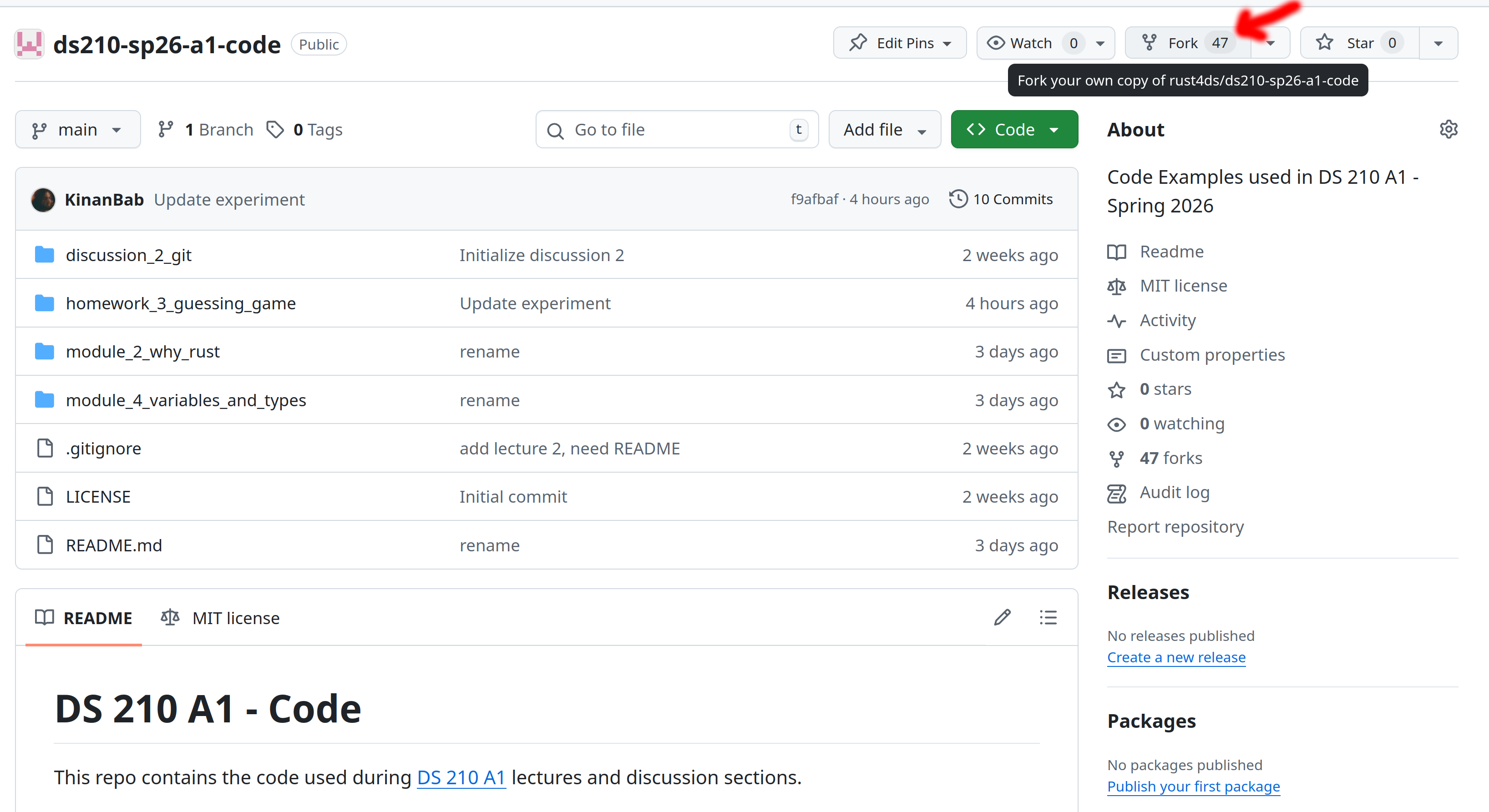
Step 1
Fork the course’s GitHub repository, which is available at https://github.com/rust4ds/ds210-sp26-a1-code. Many of you already performed this step in a previous discussion section, in which case you can skip it.
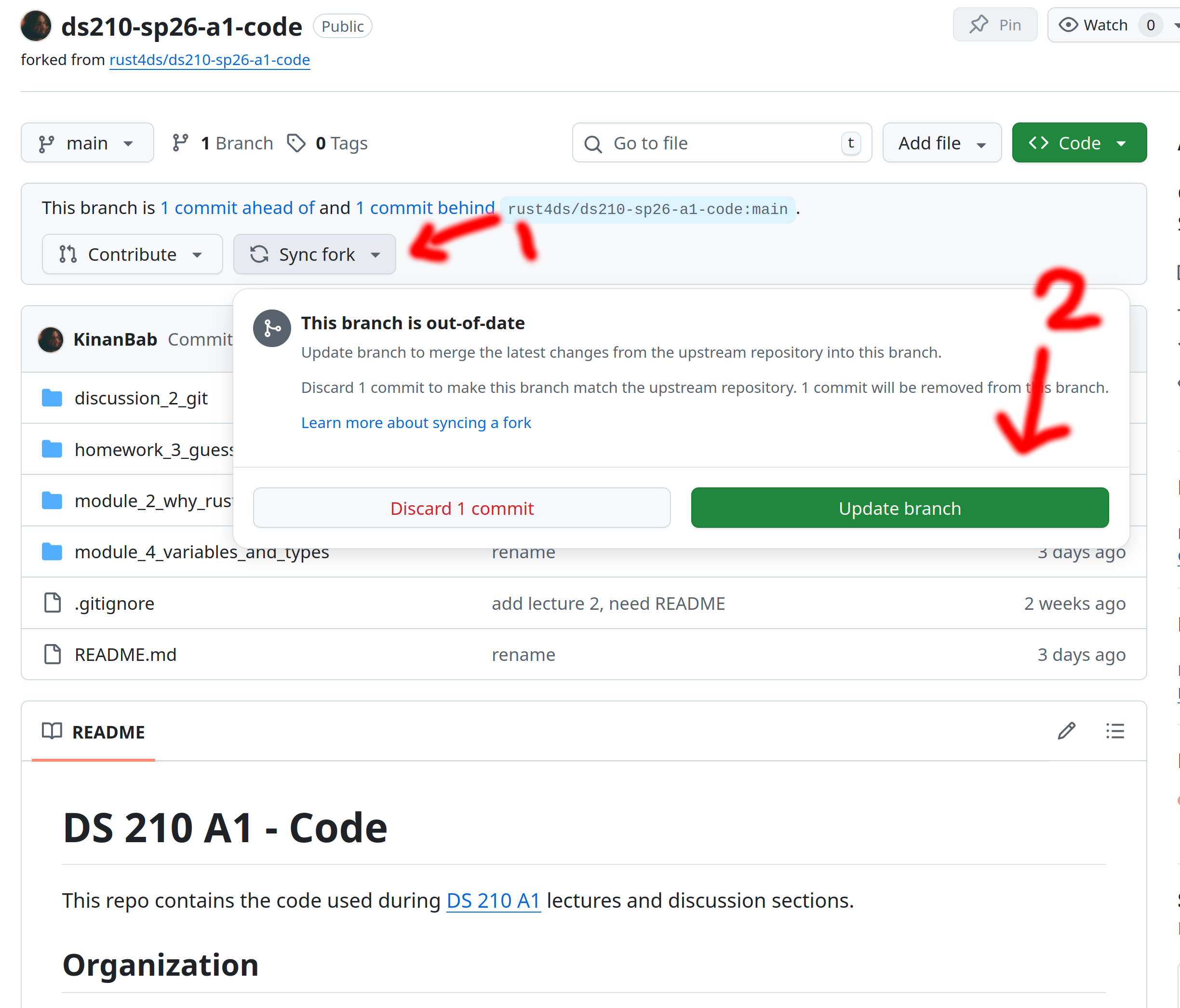
Step 2
Make sure your fork is up to date with our GitHub repo. If you look at your fork and do not see a homework 3 folder, then you need to do this step!
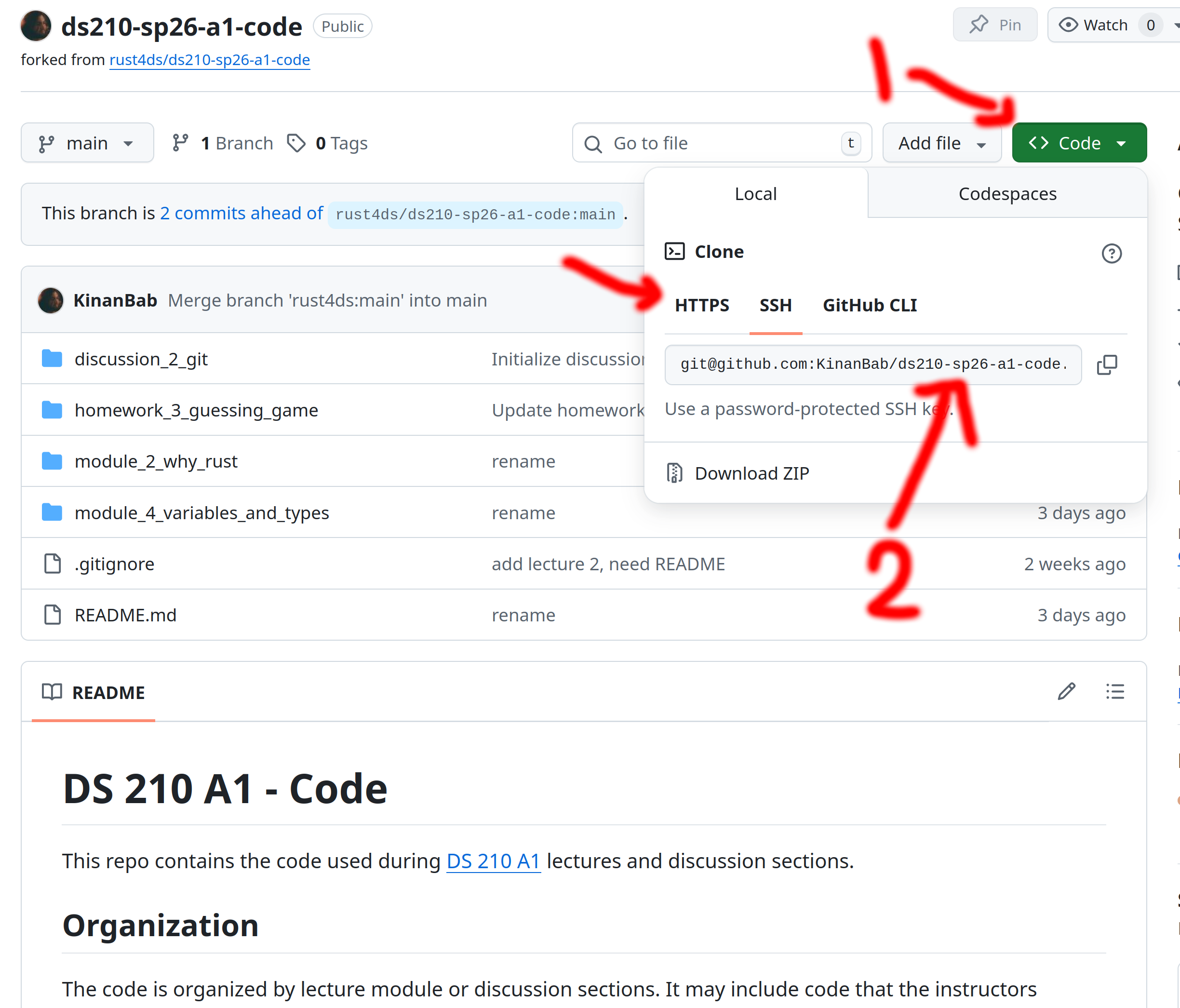
Step 3
Get the git URL for your fork from GitHub. You may want to use HTTPS or SSH depending on how you configured Git on your computer when you installed it. If you use a password to authenticate, choose HTTPS, if you use a public key, choose SSH.
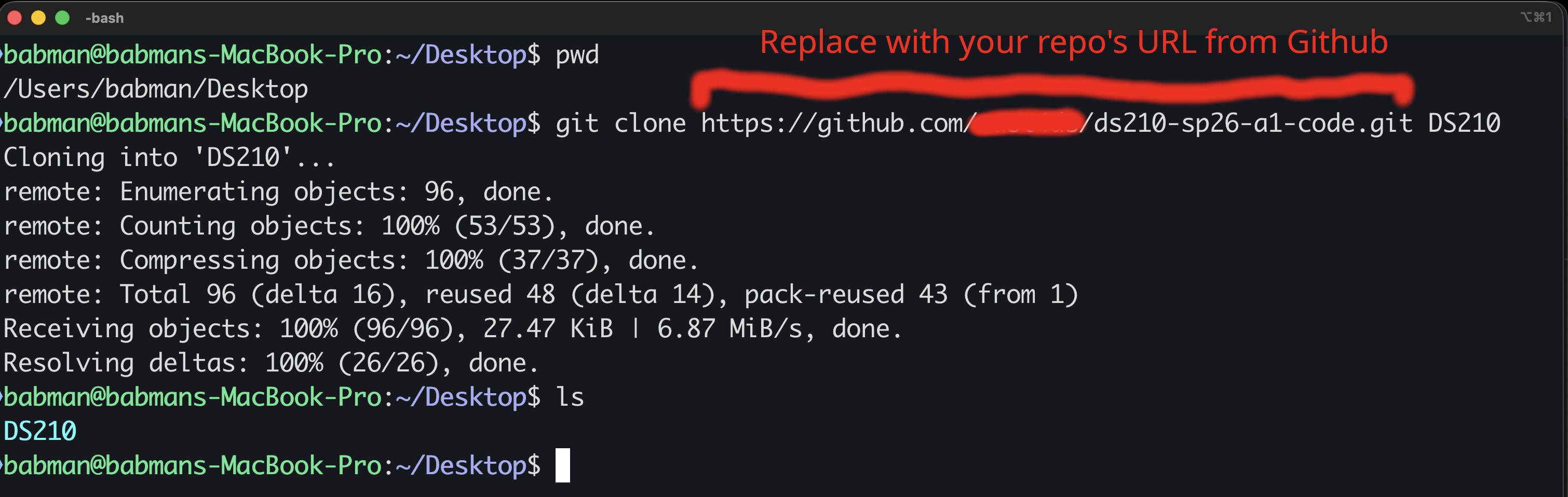
Step 4
Clone your fork via the terminal (on Mac) or via Git bash (on windows). The screenshot below clones the fork to the Desktop folder, but feel free to use a different location if you desire.
Step 5
Open the homework folder using VSCode. Make sure you open the homework folder and not a file inside it.
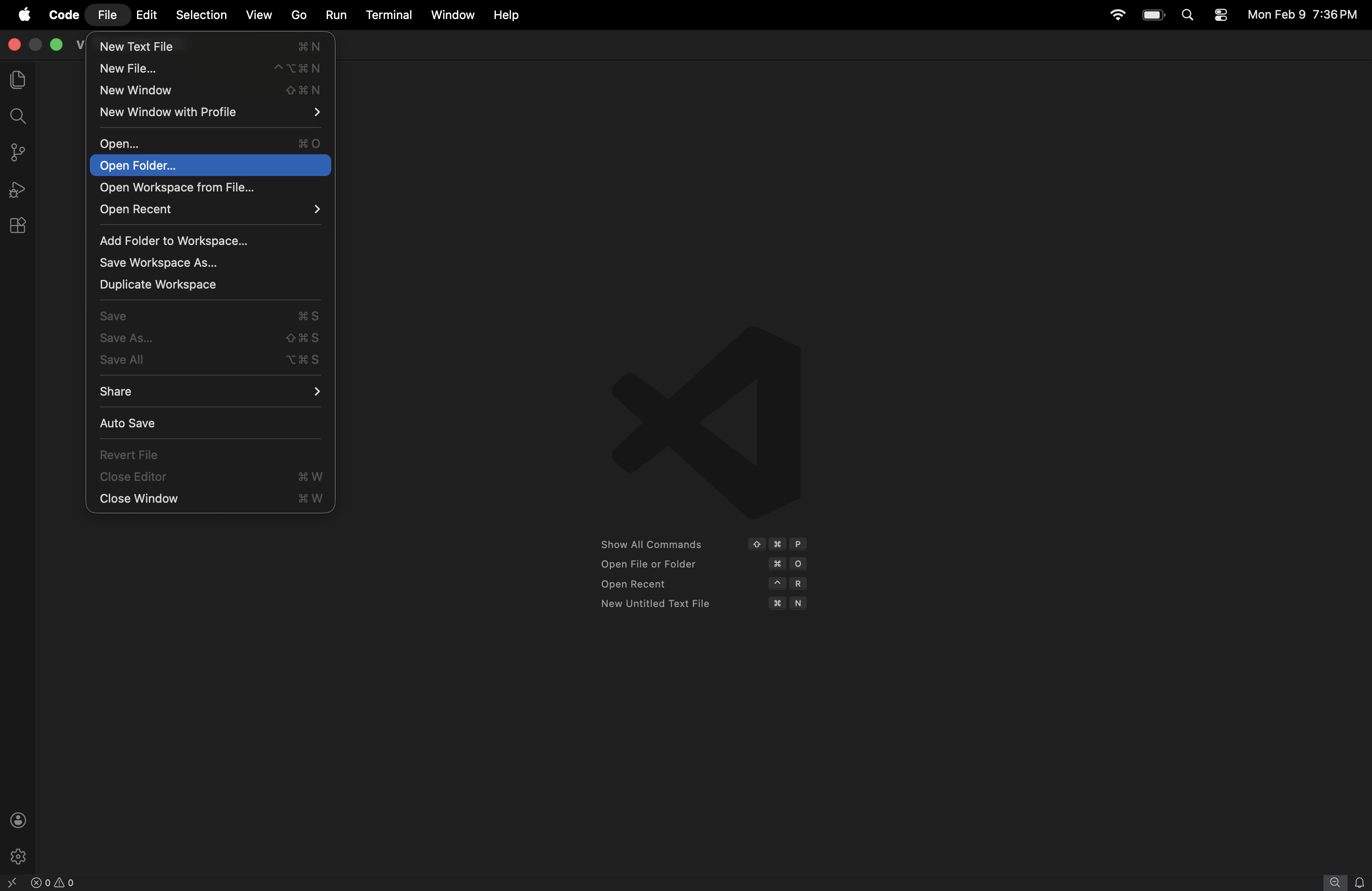
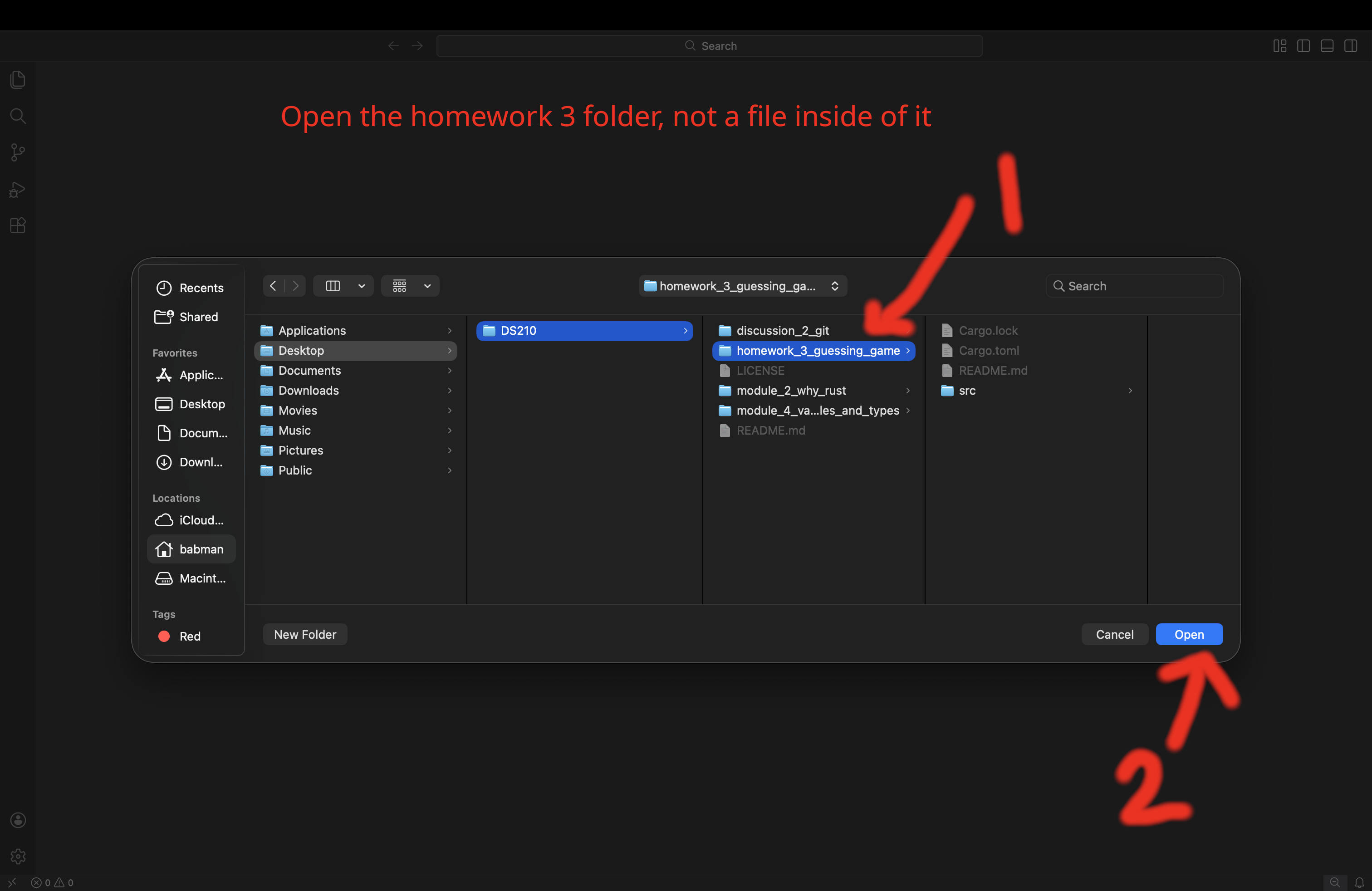
Step 6
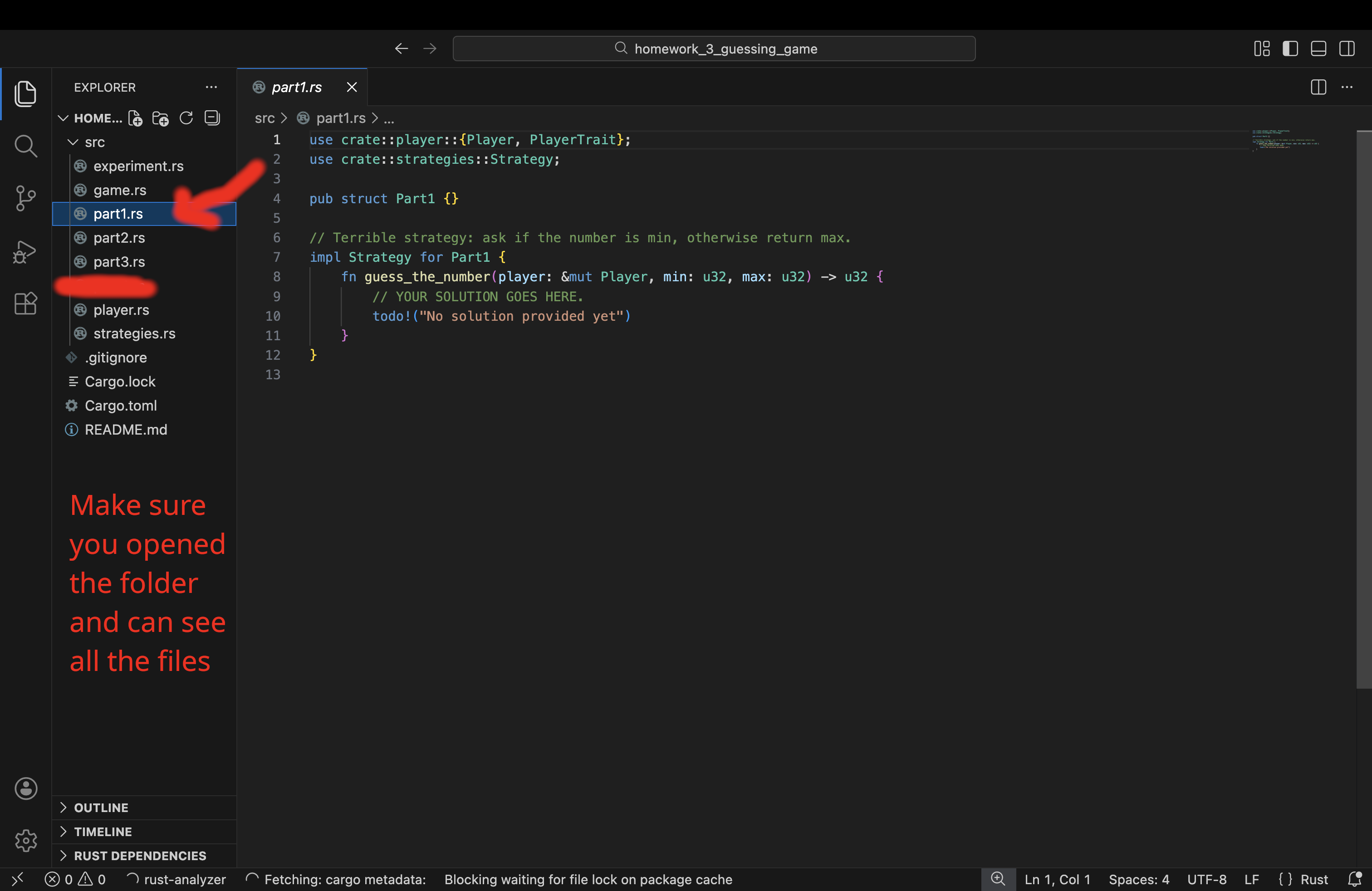
Select src/part1.rs from the VSCode navigation panel (on the left of the screen), you should be able to see the
content of the file.
Playing the Game for The First Time
After you successfully opened the stencil with VSCode, you can start playing the game.
First, use the following command to run the game the first time. You can use the shell built into VSCode to execute it:
cargo run --bin game -- --strategy random
After you run the command, Rust may need a few minutes to compile the program, then the game will start, follow the prompts
to play the game, as shown in the screenshot below. Make sure you navigate to the homework 3 folder inside where you cloned your fork.
Use pwd to confirm your current location, and cd <PATH OF YOUR CHOICE> to change folder/directory.
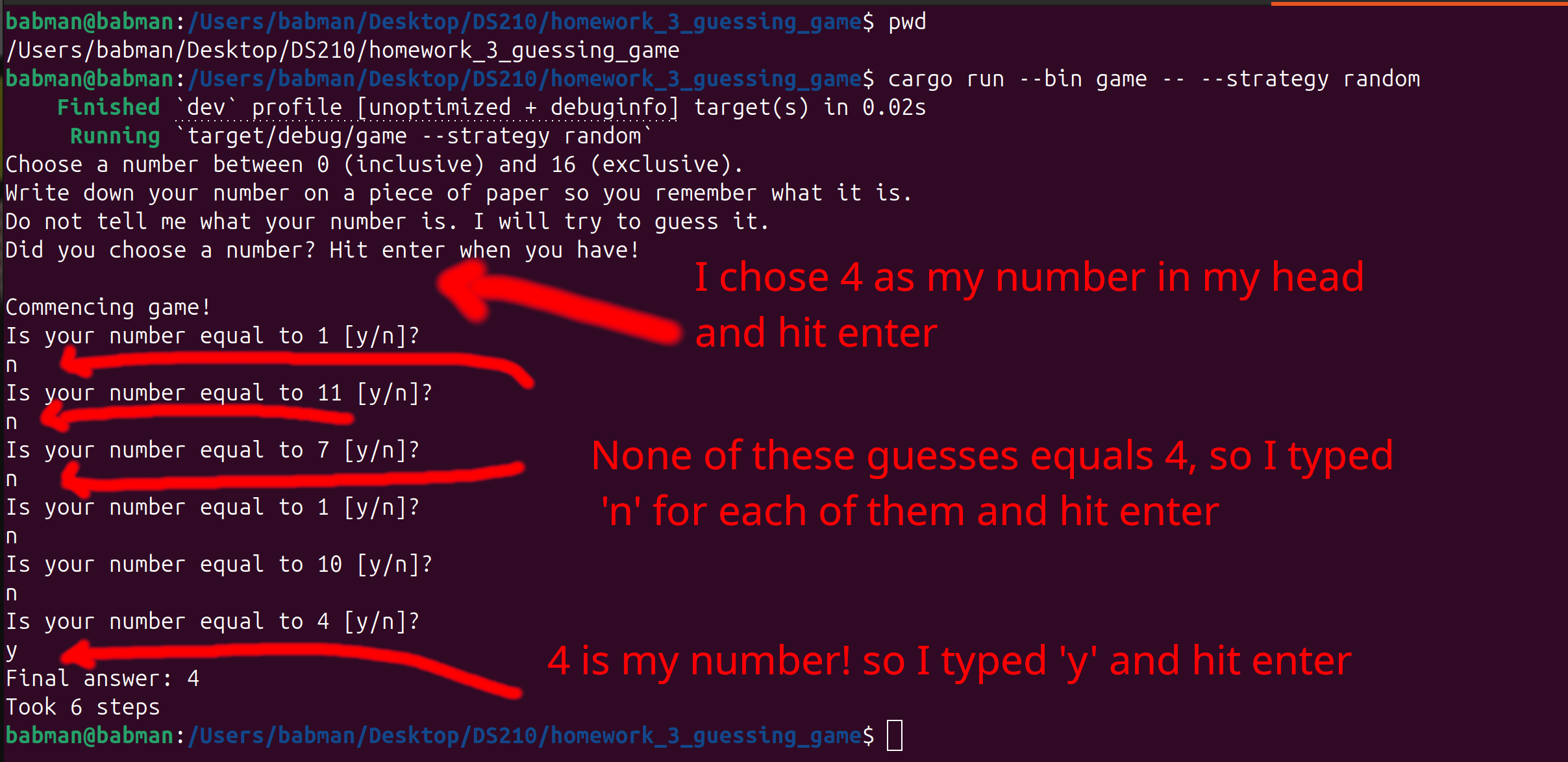
It turns out, the game supports other strategies and other configurations, use this command to list them:
cargo run --bin game -- --help
Try out a couple of different configurations to get a sense of what the game is like, for example:
cargo run --bin game -- --strategy random --min 5 --max 10
cargo run --bin game -- --strategy bad --min 2 --max 6
Finally, after you are done playing the game, try these two commands:
cargo run --bin game -- --strategy part1
cargo run --bin game -- --strategy part2
Both commands will produce an not yet implemented error! This is because it is your job in this homework to implement these two strategies, as described below!
Part 1: The “Gotta Try Them All” Strategy
If you played the game a few times as described above, it will become clear to you that:
- The
randomstrategy often takes a long time before finding the answer, often repeating bad guesses! - The
badstrategy is actually bad, and will incorrectly return answers that are wrong.
We can do better! We will think of a better strategy and implement it in src/part1.rs.
Add your solution inside the guess_the_number function (line 8).
You should remove the todo! (line 10) and replace it with your solution.
For part 1, you are tasked to implement the following strategy:
- Iterate/loop over numbers between min (inclusive) and max (exclusive).
- For each of these possibilities, ask the player if the possibility is equal to their number.
- If it is, congratulations, you found the answer! return it.
- If it is not, continue iterating to the next guess.
Hint: Look at the random strategy in src/strategies.rs (e.g. line 30) to find how you can ask the player
if the possibility equals their number.
Hint: Feel free to return some number of your choosing at the end of the function after your loop to make sure the Rust compiler is happy: your code will try all the possibilities, and one of them will be the answer, so it will never get to that point!
You can test your solution by playing the game and confirming that it always finds the right answer. Do not
forget to experiment with different values for min and max!
cargo run --bin game -- --strategy part1
When you are happy with your solution, do not forget to save it, commit it, and push it to your fork using Git. This way you will never lose it!
git add src/part1.rs
git commit -m "solution for part1"
git push
Part 2: A More Sophisticated Strategy
Part1’s strategy always produces the correct result, and is a significant improvement over random. However, if your number is big, it will take many questions before it gets to your number.
Imagine you were running with min 0 and max 64, and your number was 60. You will have to answer many questions
before the strategy finds the answer.
It turns out we can do way better, if we can ask more expressive questions.
Indeed, we provide you with player.ask_to_compare(...) function that does exactly that.
This function returns 0 if the guess equals the number, -1 if the number is smaller than the guess, and
1 if the number is greater than the guess.
#![allow(unused)]
fn main() {
// Assume the number is 4
let x1 = player.ask_to_compare(5);
let x2 = player.ask_to_compare(4);
let x3 = player.ask_to_compare(0);
// x1 is 1, x2 is 0, and x3 is -1
}
How can you use this to your advantage to derive a better strategy? Implement your solution in src/part2.rs.
Hint: Imagine you ask the player to compare their number to the middle of min and max. What does it mean when the comparison
returned -1 vs 0 vs 1?
Hint: Can you repeat the above reasoning again for the next step? What about the step after it?
Hint: This idea is one of the most powerful and common ideas in programming, and has many names, e.g., binary search or
bisection.
Hint: You can code this up in many ways, but it might be simplest to code using recursion.
You can test your solution by playing the game and confirming that it always finds the right answer. Do not
forget to experiment with different values for min and max! Notice any difference with part1?
cargo run --bin game -- --strategy part2
Part 3: Testing strategies and why tests are important
Simulating a player
Let’s assume we want to test or experiment with our strategies at scale. E.g., with max = 1000.
Currently, the bottleneck is that whenever we run the game, a human user (you) has to type in y and n or other answers
to questions manually.
We can improve this by implementing a simulated player that returns the answer to different questions programmatically, without
involving the user.
Open src/part3.rs using VSCode, and complete SimulatedPlayer implementation of ask_if_equal(...) and ask_to_compare(...).
These are different than the functions we have seen in class. They are member functions that are part of SimulatedPlayer. We will cover these in more depth in class later.
For the purposes of this homework, you can think of them as regular functions that take a special self parameter. Think of this
self parameter as “simulating” the state of mind of the user player. Specifically, this self parameter is where we
will keep our simulated number!
You can access this simulated number using self.the_number. For example, you can print that number or compare it against a guess
using the following code:
#![allow(unused)]
fn main() {
println!("{}", self.the_number);
let is_equal = self.the_number == guess;
}
Hint: Mimic is_equal above to implement ask_if_equal(...).
Hint: There are three different cases in ask_to_compare(...). What are they?
Testing part1 using the simulated player
After you implement your simulated player, you should be able to run our provided tests for part 1.
cargo test --bin game part1 -- --test-threads=1
If your implementation of part1 and your implementation of the SimulatedPlayer, you should see the three tests passing.
If they do not pass, you have a bug! Go back to your code and see if you can spot it and fix it. Consider testing part1
manually by playing the game a few times.
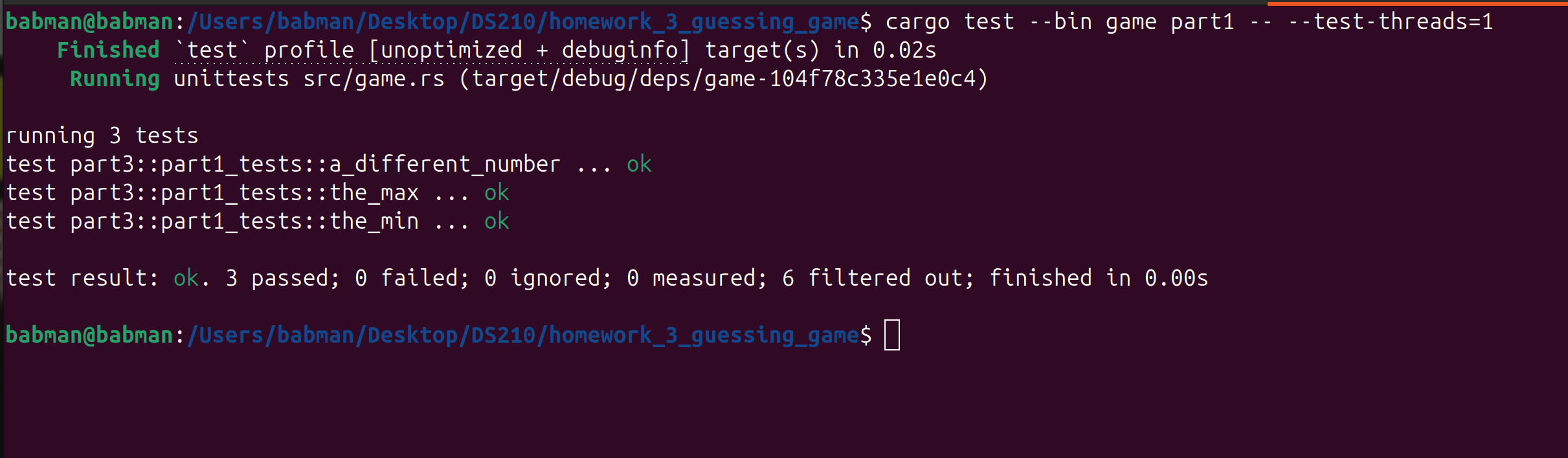
You can look at the content of these tests in src/part3.rs inside the block of code that says mod part1_tests. Read the code
slowly and try to take it in:
- There are three functions:
the_min,the_max, anda_different_number. Each correspond to one test case. - Their logic is similar, they set the parameters of the game:
min,max, and the simulatednumber. Then, they create aSimulatedPlayerwith that number. Finally, they call your part1 strategy and give it the simulated player!
Testing the bad strategy
We also provide tests for the bad strategy and for part2! However, those are incomplete and you have to add some
of their missing logic.
First, run the bad strategy tests.
cargo test --bin game bad -- --test-threads=1
You will notice that two tests the_min and the_max pass. This is not good! Had these been the only tests that we have,
we would not be able to detect that the bad strategy is bad!
Your task is to implement the missing logic (i.e., replace the todo!) in the remaining test bad_strategy_tests::a_different_number.
Your new logic should detect that bad_strategy does not work!
Run the tests again after you update the logic. Confirm that bad_strategy_tests::a_different_number fails! When you are happy with the test,
add #[should_panic] on top of the test’s function, to indicate to Rust that this test should fail. After you do that, the tests
should now pass.
#[test]
#[should_panic]
fn a_different_number() {
  // your logic goes here
}
Testing the part2 strategy
Finally, you must complete the last three tests at the end of src/part3.rs. These must test part2.
Feel free to mimic the tests we provide for part1, but make sure that
- You call the
part2strategy, and notpart1. - You test that the number of steps the strategy take is small! Mimic how the tests we provide for part1 check the number of steps, but use an appropriate smaller bound.
You can run your tests using the below command. Make sure they pass!
cargo test --bin game part2 -- --test-threads=1
FYI: We will test your tests against various correct and incorrect implementations of part1 and part2. You will receive full credit if your tests accept all the correct implementations, and fail for all the incorrect implementation. Furthermore, one of the implementations we will provide for part2 will find the correct answer, but it will take many extra steps, and your tests must correctly detect this and fail/error.
Part 4: Evaluating strategies performance
After you complete the SimulatedPlayer implementation in src/part3.rs above, you can run our provided experiment to compare
the part1, part2, and random strategies.
You can run our experiment using this command:
cargo run --bin experiment
The command will create a new file plot.png. On my computer, this was created at this path
/Users/babman/Desktop/DS210/homework_3_guessing_game/plot.png. If you cloned your fork to a different direction,
the plot will be produced in the corresponding different location.
Open the plot and look at it.
The X axis shows the max: our experiment tries all values between 1 and 100. The Y axis shows how many questions each
strategy took before it returned the answer.
Answer the following questions. For each question, write about 2-3 sentences explaining your answer. You will submit these answers via Gradescope.
Question 1: Which strategy is the best?
Question 2: For part1, assume that max = 110, can you use the plot to predict how many questions the strategy will ask? What about max = 120?
Generalizing this to max = n, can you find the number of questions as a function of n?
Question 3: For part2, many values of max end up with the same number of questions. However, the number goes up every now and then. Can you find the
identify the different values of max when an increase occurs?
Hint: counting max = 1, there are 7 such “levels”.
Question 4: Is there a pattern to the levels in part2? Try to guess when the next level will occur. Using this knowledge, if max = n,
can you estimate how many questions the strategy will ask as a function of n?
Hint: it has something to do with the powers of 2. Feel free to look online for help.
Question 5: Is there anything interesting about the random strategy? Is it sometimes better than part1 or part2? Can you describe a small change
to it that you think would improve it?
Hint: play the game with the random strategy again. What is the most annoying thing about it?
Submission
Congratulations! You are done with this homework.
You can double check your work by running all the tests in one go. Confirm that all of them pass.
cargo test --bin game
Then, submit part1.rs, part2.rs, part3.rs, plot.png, and your answers to the questions in part4 via Gradescope!
Make sure you have not modifies any of the other game files before submitting.